Visits and GPS check-in
Each time a rep stops at an outlet is a visit: check in with GPS location, work at the outlet (photos, stock count, care checklist, ordering, van sale, taking returns), then check out. The visit outcome (ordered, sold, care only, no order) is derived from the documents actually created during the visit.
Who uses it: field sales reps on the XBuddy Work app; managers review on the Outlet Visits page on the web.
Before you start
- Permissions: record visits
distribution_visits:write; viewdistribution:read. - The outlet is approved and has GPS coordinates; the rep has a beat running today.
- Visit discipline toggles (Distribution settings, defaults keep the previous behaviour):
| Toggle | Effect |
|---|---|
Check-in distance limit (m) distribution.visit_radius_m | Beyond this distance the visit is “far from outlet”. 20–5000 m, default 300. |
Check-in far from the outlet distribution.visit_far_policy | Warn (record and flag) or Block (refuse a far check-in, or one without GPS when the outlet has coordinates). Default Warn. |
GPS required at check-in distribution.visit_gps_required | Check-in without the phone’s location is refused. |
Photo first, before any visit action distribution.visit_checkin_photo_required | At least one photo before stock count, care, ordering, selling or returns. |
Photo required at check-out distribution.visit_photo_required | Check-out needs at least one photo. |
Stock count required before ordering distribution.visit_stock_count_required | Ordering and check-out need a stock count. |
Outlet care checklist distribution.visit_care_required | Off / before check-out / before ordering-selling. |
Van sale only during a visit distribution.van_sale_requires_visit | Each van sale must belong to a visit checked in at that outlet. |
Returns only during a visit distribution.return_requires_visit | Reps with a profile must be checked in to record returns. |
On the XBuddy Work app
Open today’s route
The rep opens the field sales section to see today’s beat outlets in order.
Check in
Pick the outlet and check in; the app sends the GPS location. Beyond the allowed distance the visit is flagged “far from outlet” (or blocked if the toggle is set to Block).
Work at the outlet
Take photos, count shelf stock, fill in the care checklist, place an order, sell from the van or take returns — according to the toggles that are on.
Check out
End the visit; if no order was placed, pick a no-order reason from the company’s own list.
Offline: check-in, ordering, stock count, van sales and returns carry a device key, so they are queued and resent when the connection is back without creating duplicates. A resend is still accepted for the same rep’s visit from yesterday that is still open; older visits can only be checked out.
On the web
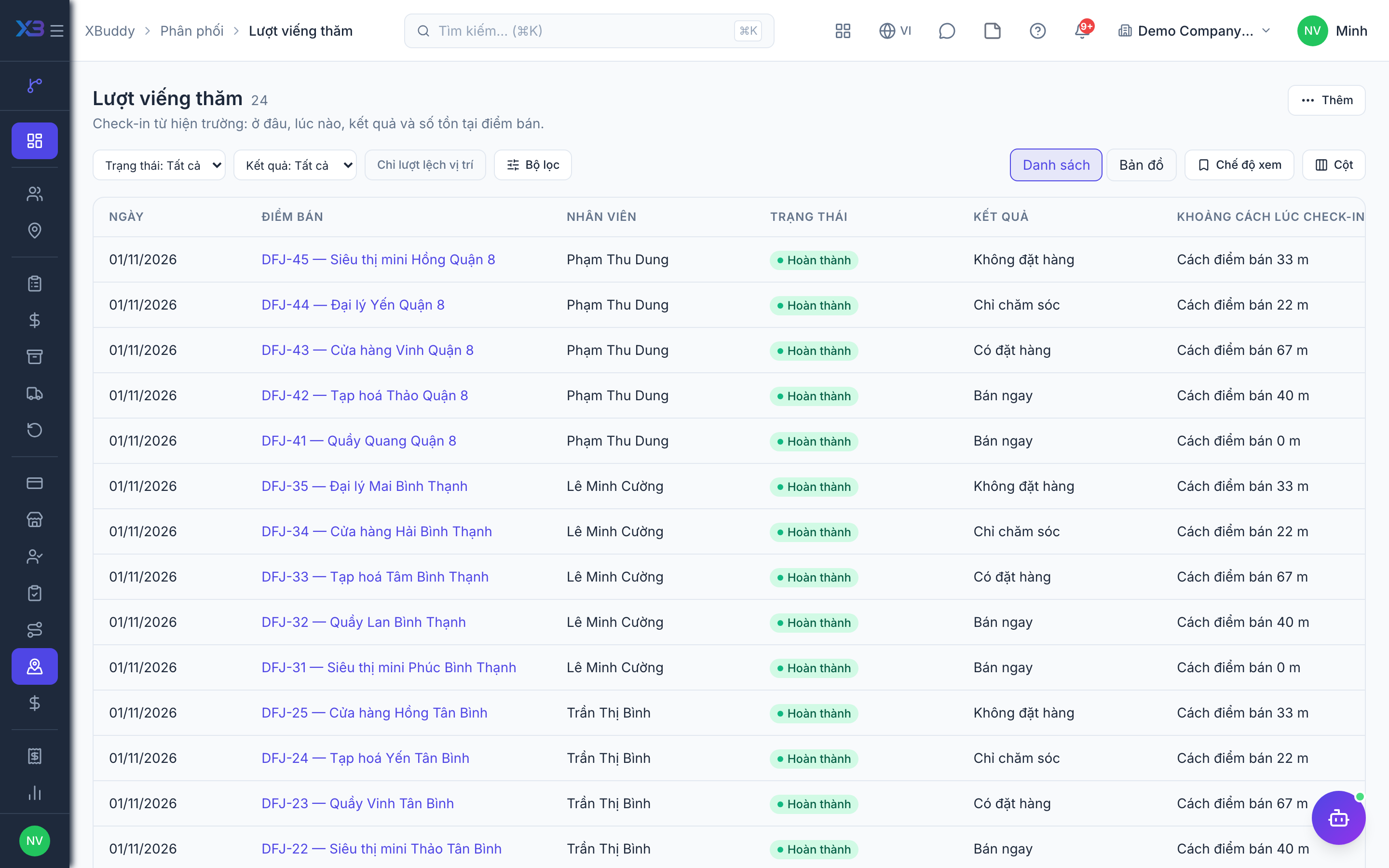
Go to Distribution → Outlet Visits to see visits, distance and far-from-outlet flags, photos, care results and orders placed during the visit; a map view is available.
Cancel a visit: only in-progress visits; by the visit owner or a manager with distribution:write in scope; a reason is required. A visit with an order that has not been rejected cannot be cancelled. Cancelling is web-only for now.
Related
- Outlets and care · Beats and route planning · Visits and check-in · Field sales rep journey
- Ordering at the outlet · Promotions, rebates & claims · Targets and sell-out · Commissions
- Beat KPIs and performance · Overview and reports · Permissions and settings · Setup guide
- Distribution Manager AI assistant · Workflow templates · Distribution & logistics flow · XBuddy Work app