Inventory
XBuddy Inventory is the single source of truth for everything you physically stock. It tracks on-hand quantity across warehouses, receives goods from suppliers, moves and counts stock, and runs the full outbound fulfillment flow — pick, pack, dispatch, transit — right through to delivery. Every stock movement values inventory correctly and posts COGS and stock valuation to Accounting.
Who uses it: warehouse and inventory managers keeping stock accurate, receiving clerks processing goods receipts, fulfillment staff picking and packing orders, and procurement/logistics owners planning replenishment. Inventory sits between Procurement (what comes in) and Sales (what goes out), and feeds Accounting the numbers that matter.
Unit of Measure (UOM) conversion runs where it matters: at buy (Goods Receipt) and at sell (Goods Issue). Once stock is on hand it is always held in the item’s base unit, so internal moves (transfers, adjustments, stocktakes) are base-unit and need no conversion.
Key Features
- Item master with SKU, category, UOM, and costing method (FIFO, AVCO, or standard)
- Lot/batch and serial-number tracking with expiry management
- Multi-warehouse and multi-location on-hand visibility
- Reorder points and stock requests for automatic replenishment
- Goods Receipt (GRN) with UOM conversion from purchase orders
- Stock transfers between warehouses and inventory adjustments
- Stocktaking / cycle counting to reconcile physical vs. system
- Full outbound flow: pick → pack → dispatch → transit → history
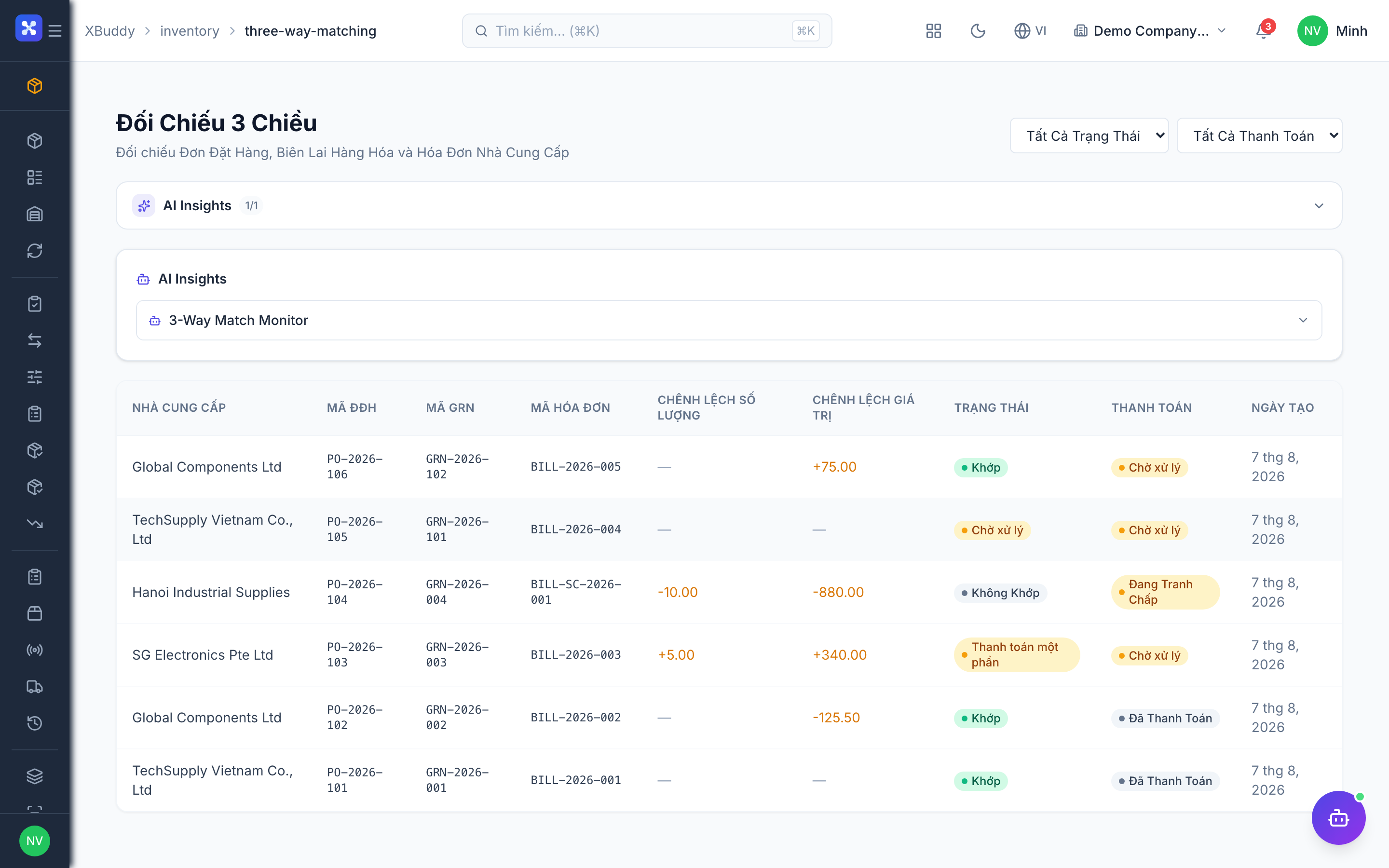
- Three-way matching between PO, goods receipt, and supplier bill
- Automatic COGS and stock valuation postings to Accounting
Important features
Items master
The item master defines every stock-tracked product: its SKU, unit of measure, and how it is costed. Costing method (FIFO, AVCO, or standard) drives how COGS is calculated when the item leaves stock.
Create an item
Go to Inventory → Items → New Item. Set the SKU, name, category, base UOM, and costing method.
Enable lot or serial tracking
If the item needs traceability, turn on lot/batch or serial tracking so each unit or batch is recorded on receipt and issue.
Set the base and alternate units
Define the base (stock) unit and any purchase/sales units. UOM conversion factors let you buy in boxes and stock in pieces automatically.
Warehouses & multi-location
Warehouses hold your stock; each can have sub-locations. On-hand quantity is tracked per warehouse so you always know where inventory physically sits.
Set up warehouses
Go to Inventory → Warehouses → New Warehouse, name it, and optionally add locations/bins.
Check on-hand by location
Open any item to see its on-hand quantity broken down by warehouse and location.
Reorder & stock requests
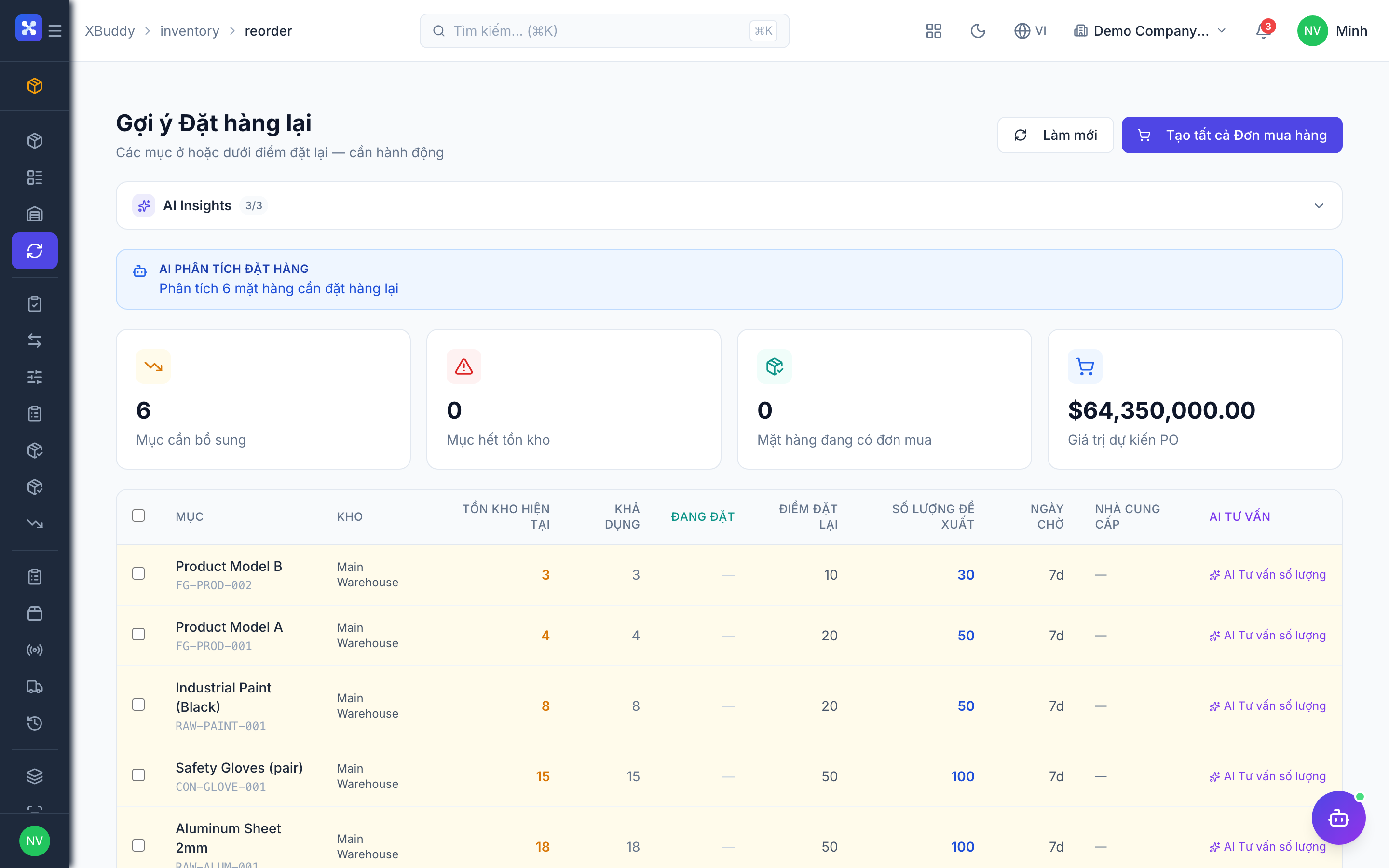
Reorder points trigger replenishment before you run out. When stock dips below the reorder level, a stock request can be raised and cascaded to procurement.
Set reorder levels
On an item (or in Inventory → Reorder), set the reorder point and target quantity.
Raise a stock request
When stock is low, create a request in Inventory → Inventory Requests. The Inventory Planner agent can propose what and how much to reorder, which flows into a purchase order.
Goods Receipt (GRN) with UOM conversion
The Goods Receipt Note records stock arriving from a supplier, usually against a purchase order. This is where UOM conversion happens — receive in the purchase unit, store in the base stock unit.
Create the GRN
Go to Inventory → GRN → New Receipt and select the purchase order to receive against.
Confirm quantities and units
Enter received quantities in the purchase unit; XBuddy converts to the base unit using the item’s conversion factor and updates on-hand.
Post
Confirming the GRN increases stock, values it (per the costing method), and posts stock valuation to Accounting. It also feeds three-way matching.
Stock transfers & adjustments
Transfers move stock between warehouses; adjustments correct on-hand for damage, loss, or count differences. Both operate in the base unit.
Transfer stock
Go to Inventory → Transfers → New Transfer, choose source and destination warehouses, and the items/quantities to move.
Adjust stock
For corrections, use Inventory → Adjustments to increase or decrease on-hand with a reason; the change posts to Accounting.
Outbound fulfillment flow
Outbound handling takes a sales order from allocation to delivery through distinct stages so nothing ships without being picked, packed, and dispatched.
Pick
In Inventory → Outbound Picking, generate a pick list for the order and pick the items from their locations.
Pack
Move to Outbound Packing to pack the picked items and record the package.
Dispatch and track
Use Outbound Dispatch to hand off to the carrier, then Outbound Transit tracks the shipment until delivery. Completed shipments land in Outbound History.
Lots, serials & expiry
Lot and serial tracking give full traceability. Lots track batches (with expiry dates); serials track individual units. Both are captured on receipt and consumed on issue.
Trace a lot
Go to Inventory → Lots to see every batch, its remaining quantity, and expiry date. Expiring lots are surfaced for action.
Trace a serial
Go to Inventory → Serials to look up any serialized unit and its full movement history.
Full feature reference
| Nav item | What it does |
|---|---|
| Overview | Inventory dashboard with stock value, low-stock alerts, movement volume, and warehouse KPIs. |
| Items | Master catalog of stock-tracked products: SKU, UOM, costing method, lot/serial flags, and per-warehouse on-hand. |
| Warehouses | Warehouse and location/bin setup; the physical structure that on-hand quantity is tracked against. |
| Reorder | Reorder-point management showing which items are at or below their replenishment threshold. |
| Inventory Requests | Internal requests for stock replenishment that can cascade into a purchase order. |
| Transfers | Stock movements between warehouses/locations, operating in the base unit. |
| Adjustments | Manual increases/decreases to on-hand for damage, loss, or count corrections, with a reason and journal posting. |
| Stocktaking | Physical count / cycle-count workspace to reconcile counted quantities against system on-hand. |
| GRN | Goods Receipt Notes recording supplier deliveries, applying UOM conversion and valuing incoming stock. |
| Returns | Customer and vendor returns that put stock back or send it out, reversing the original movement. |
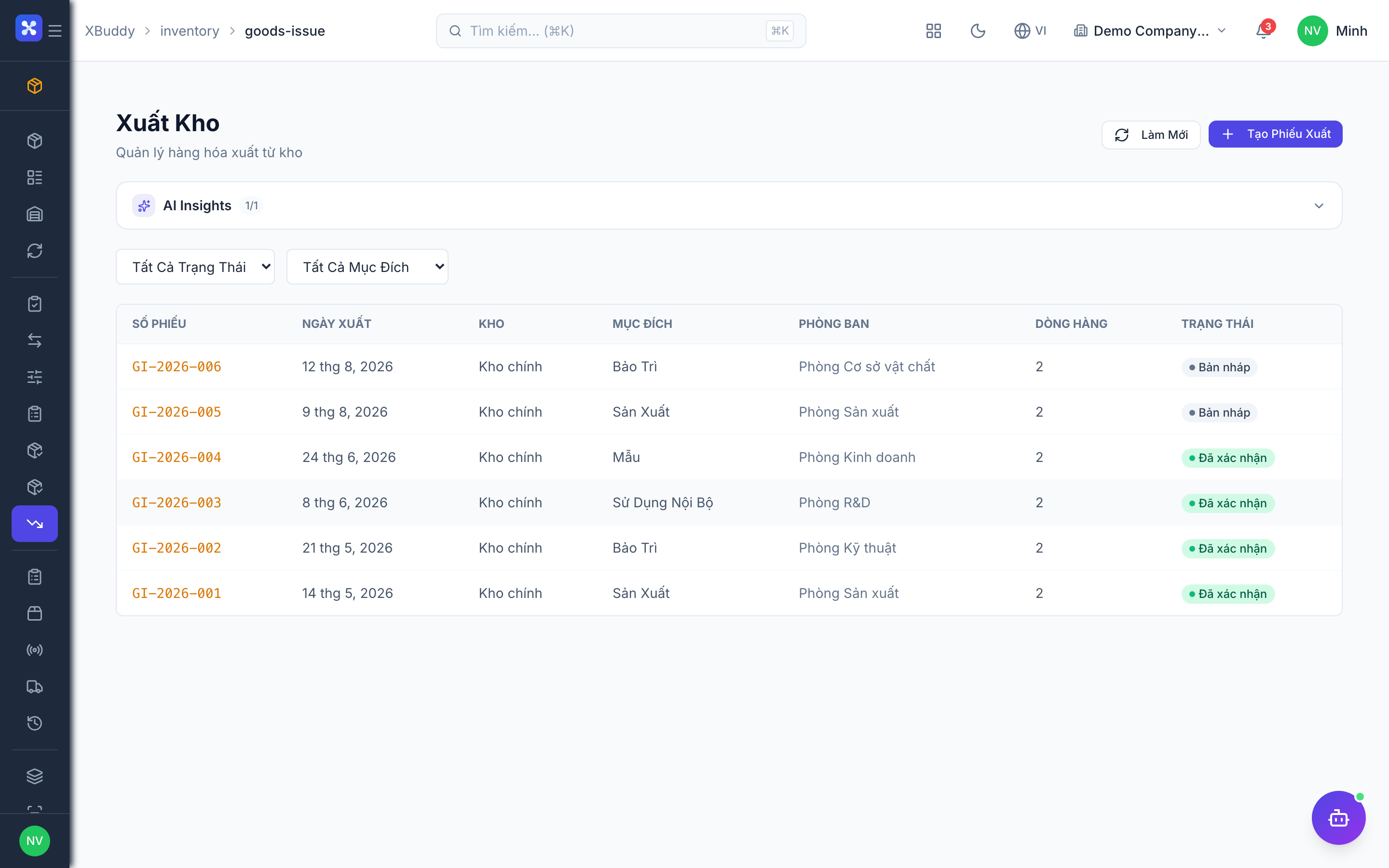
| Goods Issue | Outbound stock consumption (delivery/sale), where UOM conversion to base unit and COGS posting occur. |
| Outbound Picking | Pick-list generation and picking of items for outbound orders. |
| Outbound Packing | Packing of picked items into packages ready for dispatch. |
| Outbound Dispatch | Hand-off of packed shipments to a carrier. |
| Outbound Transit | In-transit tracking of dispatched shipments until delivery. |
| Outbound History | Archive of completed outbound shipments for audit and lookup. |
| Lots | Batch/lot register with remaining quantity and expiry tracking. |
| Serials | Serial-number register with per-unit movement history for full traceability. |
| 3-Way Matching | Reconciliation of purchase order, goods receipt, and supplier bill to validate quantities and prices. |
| Suppliers | Supplier records relevant to receiving and replenishment. |
| Reports | Inventory reporting: stock valuation, aging, movement, turnover, and shortage reports with CSV export. |
| AI Hub | Run inventory AI assistants (Inventory Planner, Procurement Assistant, Logistics Coordinator) and review suggestions. |
| Workflows | Automation for inventory events — low-stock alerts, auto-reorder, or transfer approvals. |
| Settings | Configure costing method defaults, UOM, warehouses, permissions/data scope, and inventory master data. |
Integration points
| Connects to | How the data flows |
|---|---|
| Procurement | Purchase orders are received as Goods Receipts (GRN); received stock increases on-hand and drives three-way matching. |
| Sales | Confirmed sales orders trigger goods issue and the outbound pick→pack→dispatch flow to fulfill the delivery. |
| Accounting | Every receipt, issue, transfer, and adjustment posts stock valuation and COGS to the general ledger. |
| Manufacturing | Raw materials are consumed from stock for work orders (in base units) and finished goods are received back into inventory. |
Related AI agents
| Agent | What it does |
|---|---|
| Inventory Planner | Watches stock levels and reorder points, forecasts demand, and proposes what to replenish and when. |
| Procurement Assistant | Turns replenishment needs into purchase orders, checks supplier terms, and flags receiving mismatches. |
| Logistics Coordinator | Optimizes the outbound flow and shipment routing, surfacing delays and dispatch priorities. |
Common workflows
1. Receiving from a purchase order
- Procurement approves a purchase order.
- Goods arrive; create a GRN in Inventory → GRN against that PO.
- Enter received quantities in the purchase unit — UOM conversion stores them in the base unit and increases on-hand.
- Posting the GRN values the stock and posts to Accounting; it also feeds 3-Way Matching for the supplier bill.
2. Fulfilling a sales order
- A sales order is confirmed in Sales.
- Goods Issue consumes stock (converting sell units to base, posting COGS).
- The order moves through Outbound Picking → Packing → Dispatch → Transit.
- On delivery, the shipment lands in Outbound History and Finance can invoice the shipped goods.
3. Cycle count to correction
- Start a count in Inventory → Stocktaking for a warehouse or category.
- Enter counted quantities; XBuddy shows the variance vs. system on-hand.
- Post the count — differences create Adjustments that reconcile on-hand and post to Accounting.
FAQ
When does UOM conversion actually run? Only at the boundaries: buy (Goods Receipt) and sell (Goods Issue). Stock on hand is always held in the base unit, so transfers, adjustments, and stocktakes need no conversion.
Which costing method should I use? FIFO values issues at the oldest cost layers; AVCO uses a moving average; standard uses a fixed cost. Set the default in Settings and override per item in the item master.
How do I track expiry? Enable lot/batch tracking on the item. Each receipt records a lot with an expiry date, and Inventory → Lots surfaces expiring batches.
What is three-way matching? It compares the purchase order, the goods receipt, and the supplier bill (quantities and prices) so you only pay for what you ordered and received. Mismatches are flagged in 3-Way Matching.
Can I hold stock in multiple warehouses? Yes. On-hand is tracked per warehouse (and optionally per location/bin), and Transfers move stock between them in the base unit.
Where do COGS entries come from? When stock leaves via Goods Issue (or is consumed in Manufacturing), XBuddy calculates COGS using the item’s costing method and posts it to Accounting automatically.