Accounting
XBuddy Accounting is the double-entry general ledger at the centre of the platform. Every invoice, payment, payroll run, goods receipt, and asset movement posts a journal entry here, so your books stay in sync with operations without re-keying. It ships pre-configured for Vietnam’s VAS standard (Circular 200/2014/TT-BTC, updated for TT99/2025), produces the four mandatory statutory statements, and handles bank reconciliation, VAT filing, cost centres, fixed assets, prepaid expenses, budgets, and group consolidation.
VAS-first, standard-neutral engine. The chart of accounts, posting rules, and report templates default to Vietnamese accounting standards, but the underlying ledger is standard-agnostic — you can layer IFRS/GAAP presentation on top for group reporting.
Key Features
- Double-entry general ledger fed automatically from Finance, Payroll, Inventory, and Assets
- VAS TT200/TT99 chart of accounts pre-seeded with MISA-compatible account mapping
- Posting Rules engine — route revenue, COGS, and tax to the right GL account per product category, warehouse, or dimension
- Bank Accounts, Bank Feeds (auto-import), and Bank Reconciliation with match suggestions
- AR/AP Reconciliation against sub-ledger balances
- VAT Rates and VAT Filing (Form 01/GTGT) with Compliance Calendar reminders
- Accounting Periods with open / closed / locked states and controlled year-end close
- Cost Centers and Dimensions for multi-axis analytical reporting
- Fixed Assets, depreciation runner, Asset Register, and Prepaid Expenses amortisation
- Budgets with optional line-level budget control
- Multi-company Consolidation with FX translation and NCI
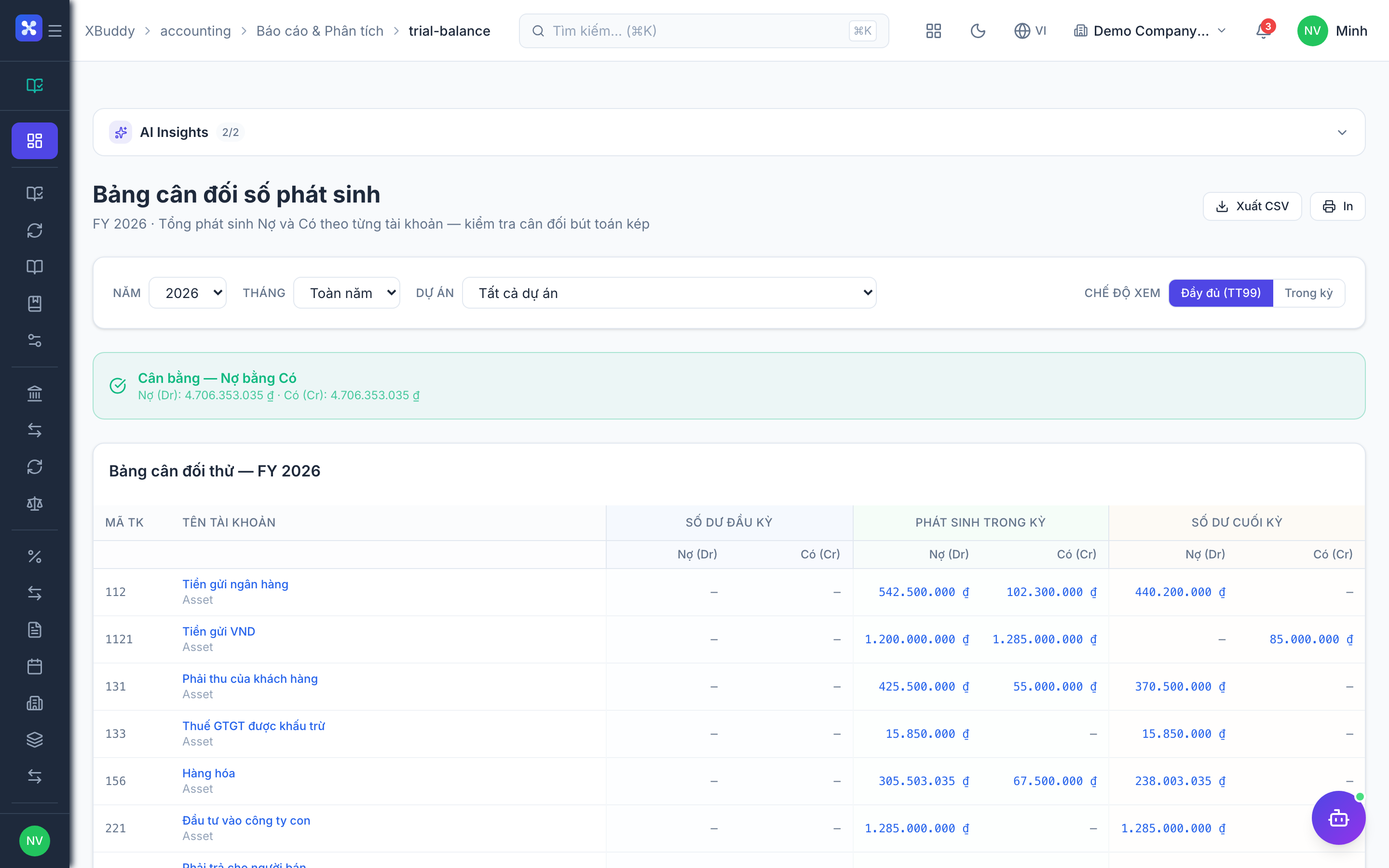
- Statutory statements: B01-DN (Balance Sheet), B02-DN (P&L), B03-DN (Cash Flow), Trial Balance, VAT Report
Important features
Recording and validating journal entries
Journal entries are the atomic unit of the ledger. Most are created automatically by source documents, but you record manual entries for opening balances, accruals, reclassifications, and corrections.
Open the journal
Go to Accounting → Journal (/accounting/journal) and click New Entry.
Enter balanced lines
Add debit and credit lines. Each line takes a GL account, an amount, and optionally a cost center and dimension values. The entry cannot be posted until total debits equal total credits.
Attach source context
Set the entry date, reference, and description. If the entry relates to another document, link it so it appears in the Document Chain.
Post or save as draft
Post immediately, or leave it as a draft for review. Posted entries in an open period can still be edited; entries in a locked period require a reversing entry.
Never edit a posted entry in a closed period. Create a reversing entry in the current open period and re-post the correction — this preserves the audit trail.
Chart of accounts and MISA mapping
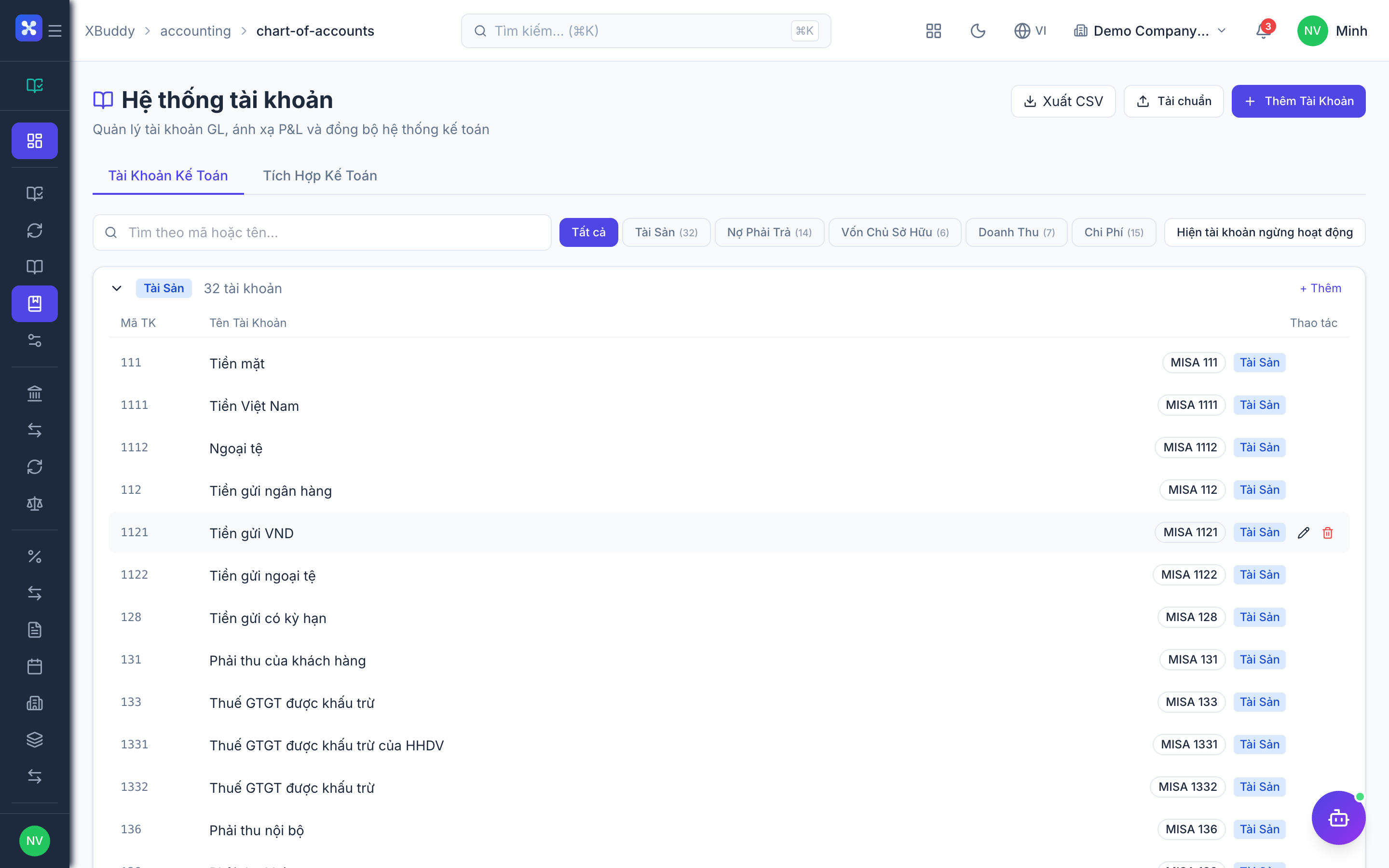
The chart of accounts follows the 3-digit VAS numbering convention and carries a MISA account code mapping so exports and integrations line up with the most common Vietnamese accounting software.
Review the seeded accounts
Go to Accounting → Chart of Accounts (/accounting/chart-of-accounts). VAS accounts (111–821) are pre-seeded and grouped by class.
Add or import accounts
Add custom accounts, or import from CSV. Set the account class, normal balance side, and parent for roll-up.
Map to MISA
On each account, set the corresponding MISA code so trial-balance and journal exports map cleanly to external filing tools.
Bank reconciliation and feeds
Bank Feeds pull transactions automatically; Bank Reconciliation matches them against ledger entries so your cash accounts are always provable.
Connect the account
Go to Accounting → Bank Accounts (/accounting/bank-accounts) and add each company bank account. Enable Bank Feeds to auto-import, or import a statement CSV manually.
Open reconciliation
Go to Accounting → Bank Reconciliation (/accounting/bank-reconciliation) and select the account and statement period.
Match transactions
Accept the system’s suggested matches (by amount and date), or match manually. Create adjustment entries for bank charges and interest not yet booked.
Confirm the closing balance
When unmatched items reach zero, confirm the reconciled balance. The statement balance should equal the GL balance.
VAT filing (Form 01/GTGT)
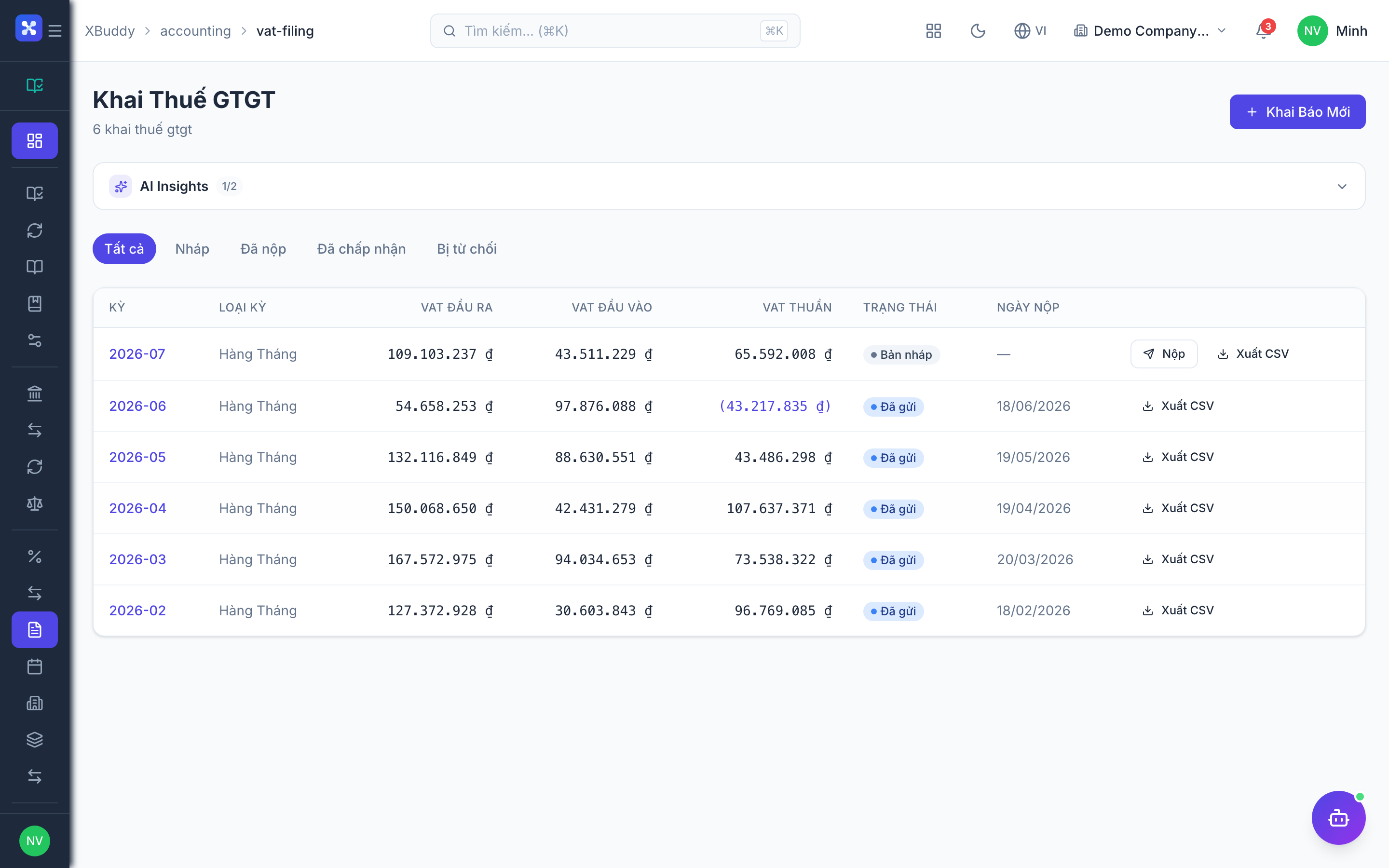
VAT Filing aggregates input and output VAT for the period into the Vietnamese declaration form, with the Compliance Calendar tracking deadlines.
Configure rates
Go to Accounting → Tax Rates (/accounting/tax-rates) and confirm your VAT rates (0%, 5%, 8%, 10%).
Generate the declaration
Go to Accounting → VAT Filing (/accounting/vat-filing), select the period, and generate Form 01/GTGT. Input VAT (account 133) and output VAT (account 3331) are aggregated from posted entries.
Reconcile and export
Cross-check against the VAT Report, resolve flagged mismatches, and export for submission.
Period close and year-end migration
Accounting Periods control which months accept postings. Year-end close rolls balances forward and can migrate the standard version (e.g. TT200 → TT99).
Reconcile sub-ledgers
Run AR/AP Reconciliation (/accounting/ar-ap-reconciliation) and confirm sub-ledger balances tie to the GL.
Close the period
Go to Accounting → Accounting Periods (/accounting/periods), verify the Trial Balance is balanced, then set the period to closed and finally locked.
Run year migration
For fiscal year-end, use Accounting → Year Migration (/accounting/year-migration) to carry forward balance-sheet balances (revenue/expense reset to zero) and optionally migrate to a new standard version via Standard Migration.
Fixed assets, prepaids, and budgets
Register assets
Go to Accounting → Fixed Assets (/accounting/fixed-assets) or create from a Bill. Set cost, useful life, and depreciation method.
Run depreciation
Use Accounting → FA Depreciation (/accounting/fa-depreciation) to post monthly depreciation journal entries; the Asset Register shows net book value per asset.
Amortise prepaids and control budgets
Manage prepaid amortisation in Prepaid Expenses (/accounting/prepaid-expenses) and set spending limits in Budgets (/accounting/budgets), optionally enforcing line-level budget control.
Full feature reference
| Nav item | Path | What it does |
|---|---|---|
| Overview | /accounting | KPI dashboard — cash position, net income, ratios, and open reconciliation items |
| Journal | /accounting/journal | Create, post, and search manual and system journal entries |
| Recurring Journals | /accounting/recurring-journals | Templates that auto-post on a schedule (accruals, allocations) |
| General Ledger | /accounting/general-ledger | Running balance and transaction detail per account |
| Chart of Accounts | /accounting/chart-of-accounts | VAS accounts with MISA mapping; add/import custom accounts |
| Posting Rules | /accounting/posting-rules | Per-dimension GL routing for revenue, COGS, and tax |
| Bank Accounts | /accounting/bank-accounts | Company bank account master and balances |
| Bank Reconciliation | /accounting/bank-reconciliation | Match bank transactions to ledger entries |
| Bank Feeds | /accounting/bank-feeds | Automated bank statement import |
| AR/AP Reconciliation | /accounting/ar-ap-reconciliation | Tie receivable/payable sub-ledgers to the GL |
| Tax Rates | /accounting/tax-rates | VAT rate definitions used across transactions |
| VAT Filing | /accounting/vat-filing | Generate Form 01/GTGT from posted VAT lines |
| Accounting Periods | /accounting/periods | Open / closed / locked period control |
| Cost Centers | /accounting/cost-centers | Departmental cost allocation and P&L |
| Dimensions | /accounting/dimensions | Analytical tags (project, region, channel) on entries |
| Accounting Sync | /accounting/sync | Reconcile source documents that failed to post |
| Fixed Assets | /accounting/fixed-assets | Asset master, capitalisation, and disposal |
| Prepaid Expenses | /accounting/prepaid-expenses | Prepaid amortisation schedules |
| Budgets | /accounting/budgets | Budget setup and optional enforcement |
| Consolidation | /accounting/consolidation | Multi-company roll-up with FX and NCI |
| P&L Report | /accounting/reports/pnl | B02-DN profit & loss statement |
| Dimensions Report | /accounting/reports/dimensions | P&L and balances sliced by dimension |
| Cash Flow Report | /accounting/reports/cash-flow | B03-DN indirect-method cash flow |
| Trial Balance | /accounting/reports/trial-balance | Debits/credits per account for close |
| VAT Report | /accounting/reports/vat | Input/output VAT detail supporting the filing |
| Financial Health | /accounting/reports/financial-health | Ratio and trend scorecard |
| Cash Flow Forecast | /accounting/reports/cash-flow-forecast | Projected cash position |
| Asset Register | /accounting/asset-register | Net book value listing of fixed assets |
| FA Depreciation | /accounting/fa-depreciation | Depreciation run and posting |
| Standard Migration | /accounting/standard-migration | Migrate chart/reports to a new VAS version |
| Year Migration | /accounting/year-migration | Year-end balance carry-forward |
| Compliance Calendar | /accounting/compliance-calendar | Statutory filing deadlines and reminders |
| Internal Controls | /accounting/internal-controls | Control checks and segregation-of-duties monitoring |
| Audit Logs | /accounting/audit-logs | Immutable trail of ledger and configuration changes |
| Agents | /accounting/agents | AI agents scoped to accounting |
| Workflows | /accounting/workflows | Automation rules for close and posting tasks |
Integration points
| Integrates with | Direction | What flows |
|---|---|---|
| Finance | Inbound | Invoices, bills, expenses, and payments auto-post journal entries |
| Payroll | Inbound | Salary, BHXH, and PIT liabilities post as GL entries |
| Inventory | Inbound | Goods receipts and issues post COGS and stock valuation |
| Assets | Bidirectional | Capitalisation from bills; depreciation posts back to the GL |
| Manufacturing | Inbound | WIP and finished-goods valuations flow to job-costing accounts |
Related AI agents
| Agent | What it does |
|---|---|
| Accountant Assistant | Suggests balanced journal lines, flags imbalances and anomalies, and tracks period-close task completion |
| FP&A Analyst | Cash-flow forecasting, ratio monitoring, and variance analysis against budget |
Common workflows
Month-end close
- Post all accruals and recurring journals for the period.
- Reconcile bank accounts and clear unmatched items.
- Run AR/AP Reconciliation and resolve sub-ledger differences.
- Generate the Trial Balance and confirm debits equal credits.
- Produce B01-DN, B02-DN, B03-DN, and VAT Report, then set the period to closed.
Fixed-asset lifecycle
- Capitalise the asset from a Bill or register it manually.
- Run monthly depreciation and review net book value in the Asset Register.
- On disposal, post the disposal entry and remove the asset from active depreciation.
VAT filing cycle
- Confirm tax rates and post all sales/purchase documents for the period.
- Generate Form 01/GTGT and reconcile against the VAT Report.
- Export and submit before the Compliance Calendar deadline.
FAQ
Can I change my accounting standard after go-live? Yes. Switching presentation standards changes future report templates and COA presets but never alters posted journal history — ledger balances are unaffected.
How do I correct an entry in a locked period? Post a reversing entry in the current open period and re-book the correct amount. Locked periods are immutable by design for audit compliance.
Do I have to use every account in the seeded chart? No. Unused accounts simply carry a zero balance. You can also add custom accounts; the statutory forms roll them up via account class and MISA mapping.
Why did a transaction not create a journal entry? Check Accounting Sync — a source document may have failed posting due to a missing account mapping. Fix the mapping in Posting Rules and re-run the sync.