Van stock and parts requisitions
Field crews consume parts from van/field stock; when it runs low, a requisition triggers replenishment.
When to use
Use requisitions whenever a technician needs parts for a job, so every part issued is tied to a job and unused parts come back.
Before you start
- Permissions:
field_service:readto open/field-service/stock,/field-service/catalogand/field-service/requisitions;field_service:executeto raise and run requisitions;inventory:requestto approve andinventory:writeto issue or take back. - Toggles:
service.parts_requisition_workflow(default off, on for new companies) creates requisitions waiting for approval instead of drafts;service.enforce_inventory_link(default off) makes job parts reduce stock through Inventory goods issues and freezes the separate Field Service stock book.
Track field stock
Go to Field Service → Stock (/field-service/stock) to see part quantities held by each technician or van.
Raise a requisition
Open Field Service → Requisitions (/field-service/requisitions) to request parts. The requisition cascades: field stock → central inventory Stock Request → purchase order if needed.
Consume on the job
Parts used on a job are recorded against it, decrementing field stock and posting the material cost.
Import requisitions from a file
Use the import page (/field-service/requisitions/import) to create many requisitions from a CSV; errors are reported by row.
Return what is left
Unused parts must be returned before the job is closed. Use the returnable list on the job to see what is owed back.
Build a requisition from the job plan
From a job, create a requisition from its parts plan: only what is still missing compared with live requisitions is requested.
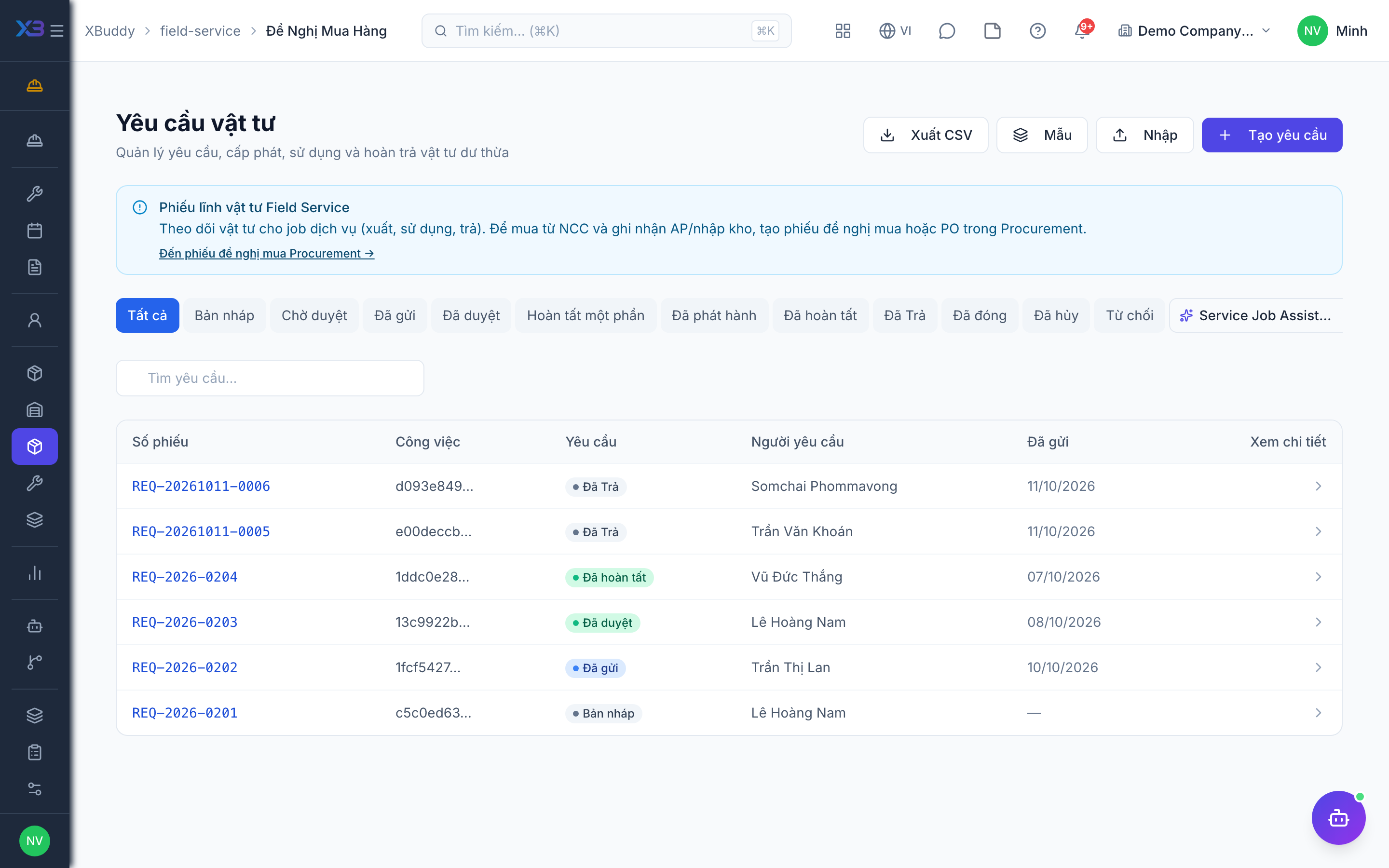
Consumed parts post a material cost to the job at the requisition cost. Confirm requisitions and consumption promptly so job costing and stock stay accurate.
Statuses
| Status | Meaning | Who moves it |
|---|---|---|
| Draft | Requisition being prepared. | Technician or coordinator. |
| Submitted / pending approval | Waiting for approval. | Requester. |
| Approved | Stock reserved. | Approver (inventory:request). |
| Issued | Parts handed over; goods issue created. | Storekeeper (inventory:write). |
| Consumed / returned | Parts used on the job, leftover returned. | Technician and storekeeper. |
| Closed | Requisition finished. | Technician (field_service:execute). |
Tips & common mistakes
- Issuing partially creates several goods issues from one requisition — that is normal.
- Parts already issued on a requisition cannot be consumed a second time for the same job.
- Do not close a job with parts still on the van that belong to the job; return them first.
- Prefer a plan-based or batch requisition over typing lines by hand.