Sales
XBuddy Sales turns a won opportunity into cash. It manages the entire order-to-cash chain — from a customer quotation, through a confirmed sales order, to a delivery order that decrements stock and an invoice that gets paid. Every document is linked, so a rep can trace a shipment back to the quote that started it, and finance can see exactly what was ordered, delivered, and billed.
Who uses it: sales reps who build quotes and orders, sales managers who set price lists and track commissions, warehouse users who fulfil delivery orders, and finance users who bill against confirmed orders. Because line items carry per-line tax and discount, unit conversions, and product references, the numbers stay consistent from quote to invoice with no re-keying.
Key Features
- Quotation builder with reusable templates, per-line tax and discount overrides, and before/after-tax columns
- Quote → Sales Order → Delivery Order document chain with full traceability
- Customer-specific and tiered price lists applied automatically on the line
- Customer returns / RMA with stock and financial reversal
- Commission rules with a rep-facing My Earnings and My Performance view
- Sales product catalog surfacing both stock and non-stock sellables
- Sales channels for splitting revenue by storefront, marketplace, or team
- Pipeline analytics, forecast, and win/loss analysis for managers
- One-click hand-off to Finance (invoice) and Inventory (goods issue)
- AI Hub with the Sales Coach and CS Guardian assistants
Important features
Quotations
A quotation is the customer-facing price proposal. XBuddy computes subtotals, per-line discounts, and tax automatically, and lets you override the tax amount on any line when a special rate applies. Save common quotes as templates to reuse them instantly.
Create a quotation
Go to Sales → Quotations and click New Quotation. Pick the customer, add line items (products or free-text), and set quantity, unit price, discount, and tax per line.
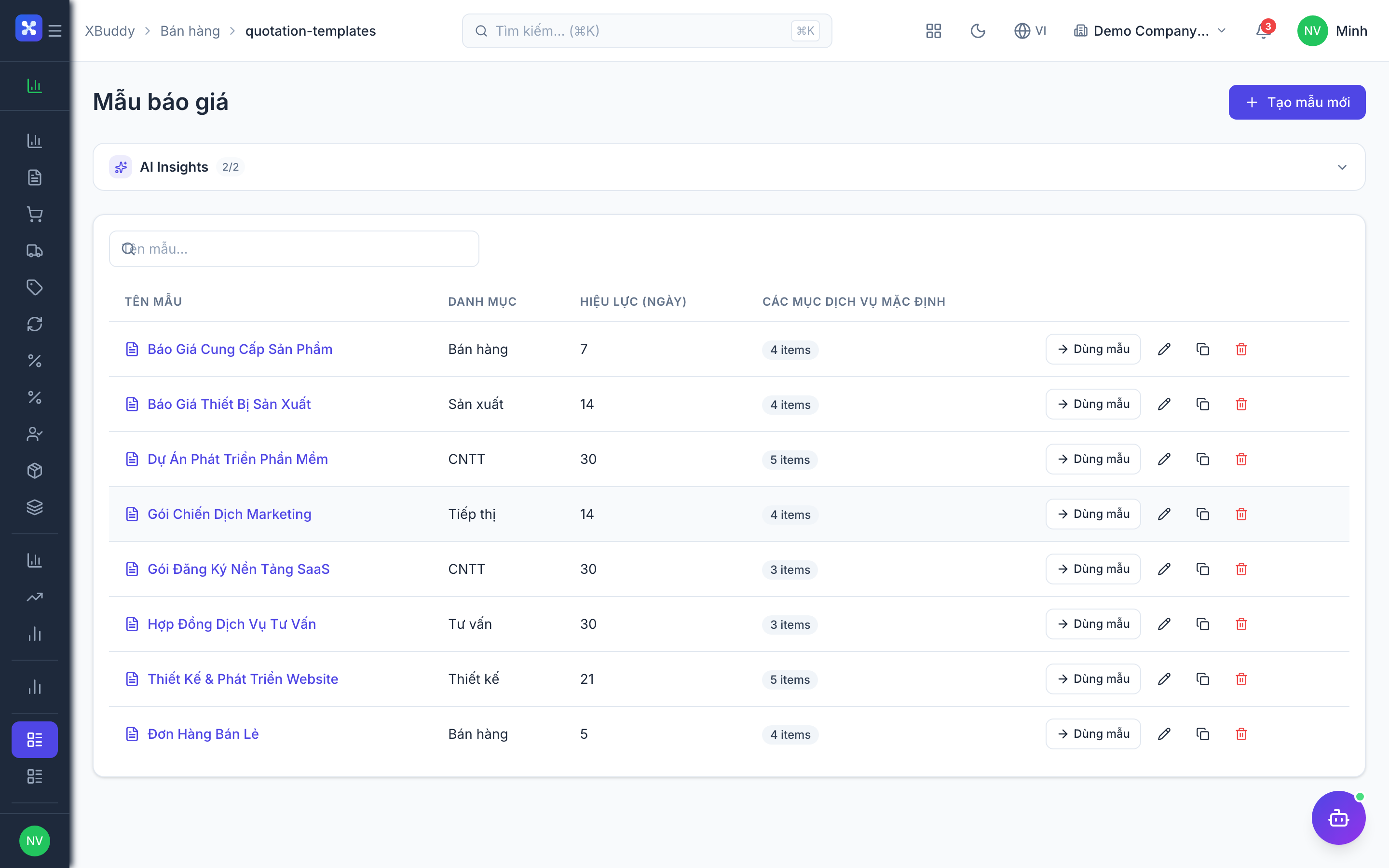
Start from a template
Click Use template to load a saved Sales Quotation Template with its line items pre-filled, then adjust quantities.
Send and track
Save and send the quotation. Its status moves draft → sent → accepted; an accepted quote can be converted to a Sales Order in one click.
Sales Orders → Delivery Orders
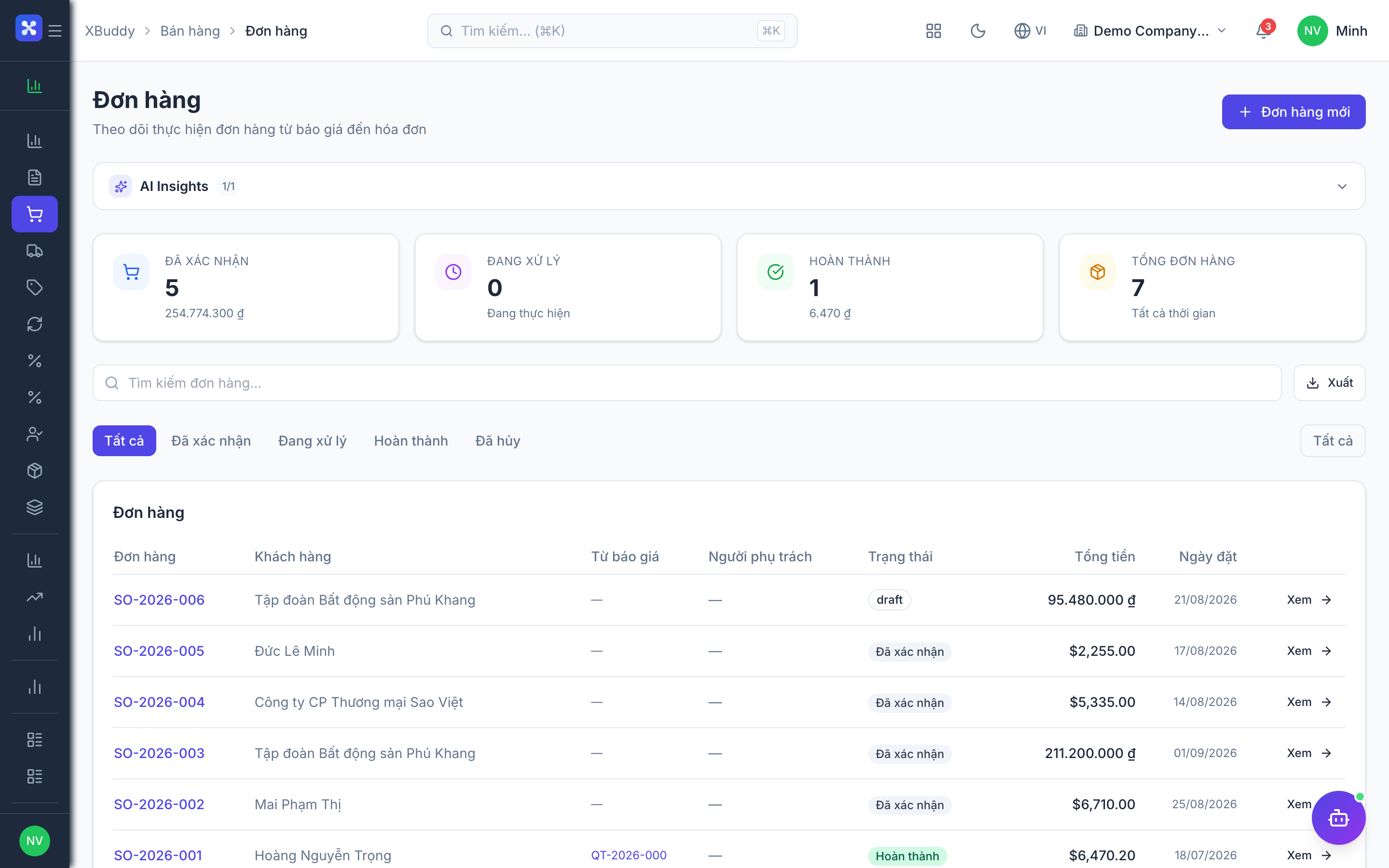
An accepted quotation becomes a Sales Order (the commercial commitment). The Sales Order can then spawn a Delivery Order that reserves and issues stock from Inventory.
Convert the quote
From an accepted quotation, click Convert to Sales Order. Line items, prices, and customer carry over.
Confirm the order
Open Sales → Sales Orders, review the order, and confirm it. Stock is reserved for the ordered items.
Fulfil with a delivery order
From the confirmed order, click Create Delivery Order. Under Sales → Delivery Orders, pick and dispatch the goods — Inventory posts a goods issue and decrements on-hand stock.
Bill it
From the delivered order, generate an invoice in Finance with the delivered quantities pre-filled.
Price lists
Price lists let you charge different customers or tiers different prices without editing every quote. When a customer with an assigned price list is selected, matching line prices fill in automatically.
Create a price list
Go to Sales → Sales Price Lists → New Price List, name it (e.g. “Wholesale”), and add products with their special price or discount percentage.
Assign it
Attach the price list to a customer or customer group. New quotes/orders for that customer use the list’s prices.
Verify on the line
When building a quotation, confirm the auto-applied price; you can still override a single line manually.
Customer returns / RMA
When a customer sends goods back, a Customer Return reverses both the stock movement (goods come back into inventory) and the financials (credit note against the original invoice).
Start a return
Go to Sales → Customer Returns → New Return and reference the original sales order or delivery order.
Select returned lines
Choose which line items and quantities are being returned; the return inherits their prices and tax.
Process it
Confirm the return. Stock is received back into the warehouse and a credit note can be raised in Finance against the customer’s balance.
Commissions & My Earnings
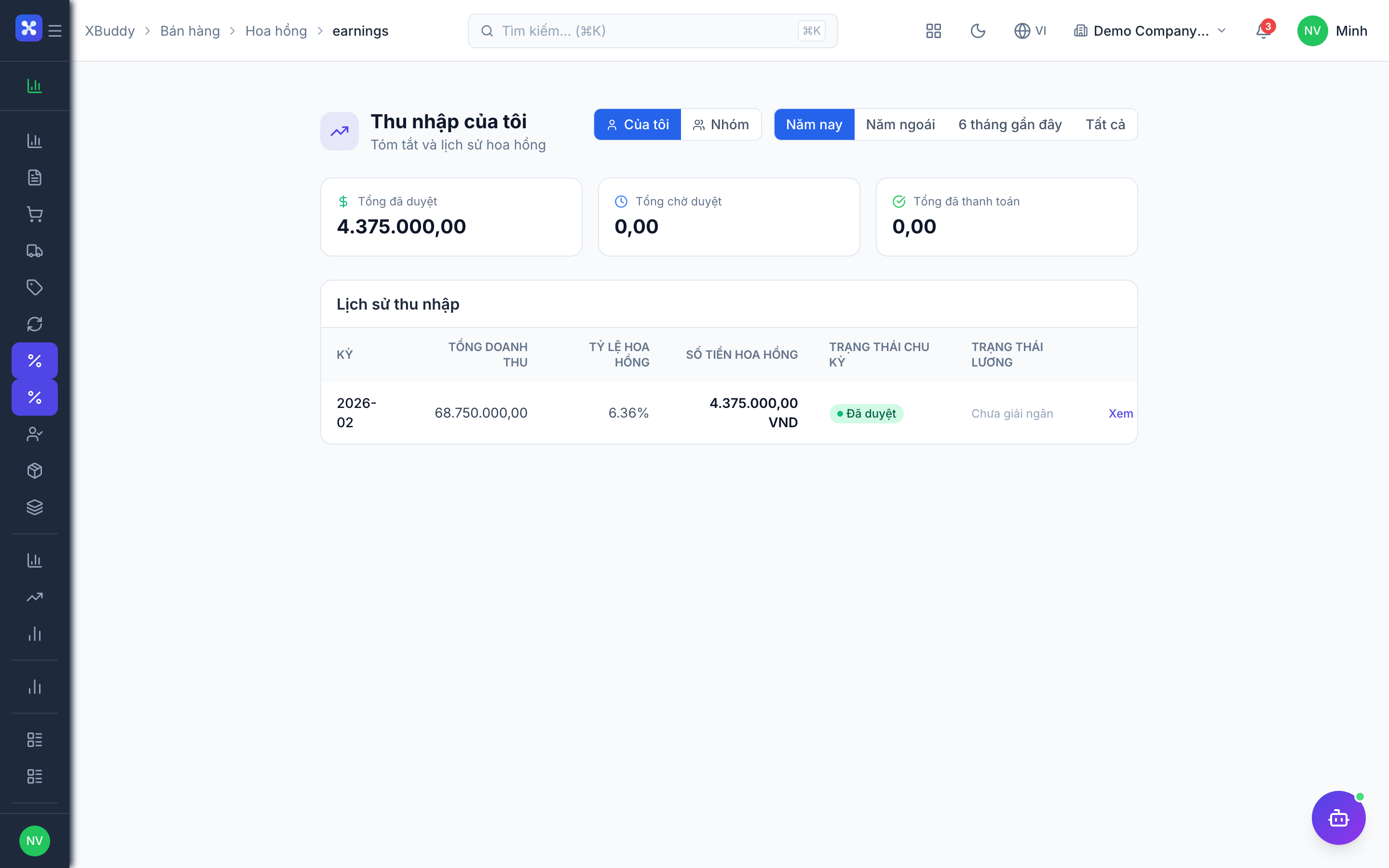
Commission rules reward reps on sales they close. Managers define the rules; reps see what they’ve earned and how they’re tracking against targets in their own personal views.
Define rules
Go to Sales → Commissions and set commission rate rules (flat, tiered, or per-product-category) and the qualifying event (order confirmed or invoice paid).
Reps track earnings
A rep opens Sales → My Earnings to see accrued commission per deal, and Sales → My Performance for quota attainment and trend.
Run and approve
Managers run a commission period; approved amounts feed Payroll or an expense payout.
Full feature reference
| Nav item | What it does |
|---|---|
| Overview | Sales dashboard with revenue, open orders, quotation-to-order conversion, and a chart of sales by period. |
| Quotations | Build, send, and track customer price proposals with per-line tax/discount and template reuse. Convert accepted quotes to orders. |
| Sales Orders | Confirmed commercial commitments. Reserve stock, track fulfilment status, and generate delivery orders and invoices. |
| Delivery Orders | Picking and dispatch documents that post a goods issue in Inventory and decrement on-hand stock for the shipped lines. |
| Sales Price Lists | Customer- or tier-specific price tables applied automatically to matching line items on quotes and orders. |
| Customer Returns | RMA workspace that reverses stock (goods back in) and finances (credit note) against the original sale. |
| Commissions | Commission rule engine (flat/tiered/per-category) with run periods and approval, feeding rep earnings. |
| My Earnings | Rep-facing view of accrued and paid commission per deal and period. |
| My Performance | Rep-facing quota attainment, win rate, and sales trend against targets. |
| Sales Products | Sellable catalog surfacing both non-stock products and stock items flagged as sellable, used by the line-item picker. |
| Sales Channels | Revenue-splitting dimension (storefront, marketplace, team) for analyzing where sales come from. |
| Pipeline Analytics | Manager report on open value, stage distribution, and conversion across the sales pipeline. |
| Pipeline Forecast | Weighted revenue projection by period, owner, and stage for committed vs. best-case planning. |
| Win/Loss Analysis | Report on closed-won vs. closed-lost with reasons, helping refine pricing and process. |
| Sales Quotation Templates | Reusable quotation blueprints with pre-filled line items for fast, consistent quoting. |
| Sales Order Templates | Reusable order blueprints for recurring or standard-configuration orders. |
| Reports | Sales reporting hub: revenue by product/customer/channel, order aging, and commission summaries with CSV export. |
| AI Hub | Run Sales AI assistants (Sales Coach, CS Guardian) and review their suggestions inline. |
| Workflows | Automation for sales events — e.g. notify a manager on a large order, or auto-create a delivery order on confirmation. |
| Settings | Configure numbering, tax defaults, commission rules, data scope, feature toggles, and sales master data. |
Integration points
| Connects to | How the data flows |
|---|---|
| CRM | A won deal generates a quotation with the account, contact, and amount pre-filled, keeping the opportunity linked to its fulfilling documents. |
| Finance | A confirmed or delivered Sales Order generates a customer invoice; customer returns raise credit notes against the customer balance. |
| Inventory | Delivery orders post a goods issue and decrement on-hand stock; returns receive goods back into the warehouse. |
| Product & Marketing | The sellable product catalog and pricing originate from the product catalog and price lists shared across apps. |
| Payroll | Approved commission amounts can flow to Payroll as a payout component. |
Related AI agents
| Agent | What it does |
|---|---|
| Sales Coach | Reviews open deals, quotes, and orders, spots stalled or under-discounted opportunities, and suggests actions to close faster. |
| CS Guardian | Watches customers for churn and renewal risk after the sale, surfacing retention actions before revenue slips. |
Common workflows
1. Quote to cash
- Build a quotation in Sales → Quotations (or from a won CRM deal).
- The customer accepts; click Convert to Sales Order.
- Confirm the order — stock is reserved.
- Create a Delivery Order; the warehouse picks and dispatches, posting a goods issue in Inventory.
- Generate an invoice in Finance from the delivered order; Finance collects payment.
2. Handle a customer return
- Open Sales → Customer Returns → New Return and reference the original order or delivery.
- Select the returned lines and quantities.
- Confirm — stock is received back and a credit note is raised in Finance.
- The customer’s balance and inventory both reflect the reversal automatically.
3. Pay commissions for the period
- Define/verify rules in Sales → Commissions.
- Run the commission period; the system accrues per qualifying order or paid invoice.
- Reps confirm their numbers in My Earnings; managers approve the run.
- Approved amounts flow to Payroll or an expense payout.
FAQ
How is per-line tax handled? Each line item computes tax from its rate, but you can override the tax amount on any single line for special cases. The quotation shows before-tax and after-tax columns so the totals are transparent.
What’s the difference between a Sales Order and a Delivery Order? The Sales Order is the commercial commitment (what the customer agreed to buy and pay for). The Delivery Order is the logistics document that actually ships goods and decrements stock. One order can produce multiple partial delivery orders.
How do price lists override standard prices? When you select a customer that has an assigned price list, matching line items pull their price from that list automatically. You can still override a single line manually if needed.
Does a customer return refund the money too? The return reverses stock immediately; the financial side is completed by raising a credit note in Finance against the original invoice, which adjusts the customer’s balance.
Where do reps see their commission? Reps use My Earnings for accrued/paid commission per deal and My Performance for quota attainment — both scoped to their own records only.
Can I reuse a common order configuration? Yes. Save it as a Sales Order Template (or Sales Quotation Template), then generate new documents with the line items pre-filled.