Payroll
XBuddy Payroll turns HR data into paid, compliant salaries every cycle. It reads employees, attendance, and approved leave from HR, applies your salary structures and variable-pay rules, calculates statutory deductions, and posts the result to the General Ledger — all with an audit trail.
Compliance is built for Vietnam out of the box: progressive Personal Income Tax (PIT) with proper tax brackets, social-insurance (BHXH) reconciliation, PIT monthly forms, and annual PIT finalization. You can simulate a run before committing, adjust individual salaries, and route the posting to the right GL accounts.
Vietnam PIT is progressive, not flat. XBuddy applies the correct tax brackets to each employee’s taxable income. Verify your Salary Structures and Accounting Mapping before your first live run.
Key Features
- Payroll runs that pull employees, attendance, and leave automatically
- Salary structures and reusable salary models
- Variable pay rules (bonuses, commissions, allowances, deductions)
- Payroll simulation to preview a run before committing
- Salary adjustments for individuals mid-cycle
- Accounting mapping that posts payroll to the General Ledger
- Vietnam compliance — progressive PIT, BHXH reconciliation, PIT forms, PIT annual
- Payslip generation published to the Self-Service Portal
Important features
Running a payroll cycle
Start a new run
Go to Payroll → Payroll Runs and create a run for the pay period. XBuddy pulls active employees, their attendance, and approved leave from HR.
Review calculated pay
The run computes gross pay from salary structures, applies variable pay, and deducts PIT and BHXH. Review the line-by-line results.
Commit and publish payslips
Finalize the run to lock the numbers. Payslips are generated in Payroll → Payslips and published to each employee’s Self-Service Portal.
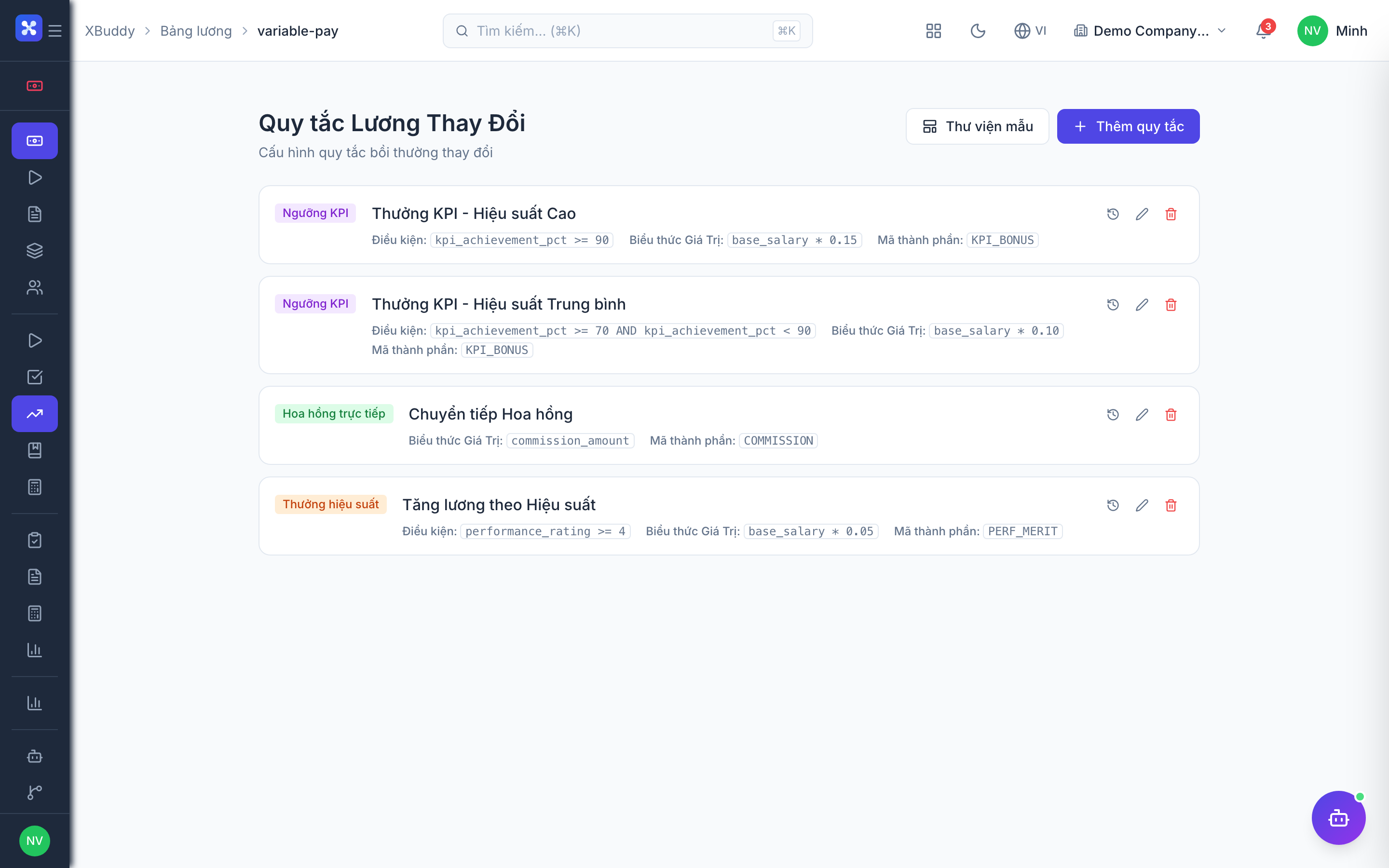
Salary structures, models, and variable pay
Define salary structures
Go to Payroll → Salary Structures to build the components of pay — base, allowances, and their tax treatment.
Create reusable salary models
Go to Payroll → Salary Models to package structures into models you can assign to roles or grades, keeping pay consistent.
Add variable pay rules
Go to Payroll → Variable Pay Rules to define bonuses, commissions, and one-off allowances or deductions that apply per run or per employee.
Simulating and adjusting
Simulate before you commit
Go to Payroll → Payroll Simulation to preview the full run — gross, deductions, and net — without creating a live run, so you can catch surprises early.
Make individual adjustments
Go to Payroll → Salary Adjustments to change a specific employee’s pay mid-cycle (raise, correction, one-off) with a reason recorded for audit.
Re-simulate and confirm
Re-run the simulation after adjustments to confirm the totals before starting the live run.
Vietnam compliance & GL posting
Map payroll to accounts
Go to Payroll → Accounting Mapping to route salary expense, tax payable, and BHXH payable to the correct GL accounts so the run posts cleanly to Accounting.
Handle monthly PIT and BHXH
Go to Payroll → PIT Forms for monthly PIT declarations and Payroll → BHXH Reconciliation to reconcile social-insurance contributions against the payroll base.
Finalize PIT annually
Go to Payroll → PIT Annual at year-end to run annual PIT finalization across all employees, reconciling withheld tax against the progressive year-end liability.
Full feature reference
| Nav item | What it does |
|---|---|
| Overview | Payroll dashboard — upcoming run, total payroll cost, headcount, and compliance status. |
| Payroll Runs | Create, review, and finalize payroll runs pulling live HR/attendance data. |
| Payslips | Generated payslips per run, published to the Self-Service Portal for employees. |
| Salary Structures | Define pay components (base, allowances) and their tax treatment. |
| Payroll Simulation | Preview a full run’s gross/deductions/net without committing. |
| Salary Adjustments | Apply individual mid-cycle pay changes with an audit reason. |
| Variable Pay Rules | Configure bonuses, commissions, allowances, and deductions. |
| Salary Models | Package salary structures into reusable models assigned to roles/grades. |
| Accounting Mapping | Route payroll expenses and payables to GL accounts for posting. |
| Payroll Compliance | Central view of statutory obligations and their status. |
| PIT Forms | Monthly Personal Income Tax declaration forms. |
| PIT Annual | Year-end PIT finalization reconciling withheld vs. progressive liability. |
| BHXH Reconciliation | Reconcile social-insurance contributions against the payroll base. |
| Reports | Payroll cost, tax, and compliance reports with CSV export. |
| AI Hub | Run and review Payroll AI agents on runs and compliance data. |
| Workflows | Automation rules for payroll events (run ready, anomaly detected, deadline). |
| Settings | Payroll configuration — periods, tax parameters, feature toggles, roles, and data scope. |
Integration points
| Integrates with | How |
|---|---|
| HR | Employees, attendance, and approved leave feed each run; leave days deduct from pay. |
| Accounting | Finalized runs post to the General Ledger via Accounting Mapping. |
| Finance | Payroll cost ties into department budgets and cash-flow planning. |
| Self-Service Portal | Payslips are published to employees; bank details from profiles drive disbursement. |
| Performance | Variable pay can reference performance/commission outcomes. |
Related AI agents
| Agent | What it does |
|---|---|
| Payroll Assistant | Checks run readiness, flags anomalies in gross pay vs. the prior period, monitors overtime and salary-band drift, and surfaces compliance reminders before finalization. |
Common workflows
- Run a monthly payroll — Create a run in Payroll Runs → XBuddy pulls attendance and leave from HR → review calculated gross, PIT, and BHXH → simulate if needed → finalize → payslips publish to Self-Service and the run posts to Accounting.
- Give a mid-cycle raise — Open Salary Adjustments → change the employee’s pay with a reason → re-run Payroll Simulation to confirm totals → include in the next run.
- Close the tax year — Run PIT Annual at year-end → the system reconciles each employee’s withheld tax against the progressive year-end liability → produce finalization forms and any refund/top-up amounts.
FAQ
Q: Does Payroll handle Vietnam’s progressive PIT correctly? A: Yes. PIT is calculated using the progressive tax brackets on each employee’s taxable income — not a flat rate. Monthly forms and annual finalization are built in.
Q: Can I preview a run before committing? A: Yes. Payroll Simulation shows the full gross/deductions/net for the period without creating a live run, so you can catch issues first.
Q: How does payroll reach the accounting books? A: Configure Accounting Mapping once to route salary expense, tax payable, and BHXH payable to GL accounts; finalized runs then post automatically to Accounting.
Q: Where do employees see their payslips? A: Payslips are published to the Self-Service Portal, where each employee can view and download their own for every period.
Q: What feeds attendance and leave into a run? A: HR supplies approved attendance and leave for the period automatically, so you don’t re-enter it in Payroll.