Learning Management System
XBuddy LMS is the full training platform for your organization. Authors build courses from mixed content (video, documents, SCORM packages, quizzes) and chain them into learning paths; administrators publish them to a catalog, enrol learners manually or via automated rules, and run instructor-led (ILT) sessions. Learners consume training in My Learning, earn certificates and badges, and climb the leaderboard, while managers track completion and compliance across their teams.
Self-paced and instructor-led in one place. Online courses (including SCORM 1.2 packages) run asynchronously in My Learning, while ILT Sessions handle scheduled classroom or virtual training with attendance — both feed the same completion records and certificates.
Key Features
- Course authoring from video, documents, SCORM 1.2 packages, and inline content
- Learning Paths that sequence courses into structured programs
- Catalog with self-enrolment and admin-driven enrolment
- Enrolment Rules — auto-assign training by role, department, or hire date
- Assessments and a reusable Question Bank with multiple question types
- Instructor-led (ILT) Sessions with scheduling and attendance
- Certificates issued on completion, with expiry for recurring compliance
- Badges and a Leaderboard for gamified engagement
- Learner management registry with per-learner profiles and history
- Team view for managers to monitor completion and overdue compliance
- Reports on completion, compliance status, and assessment performance
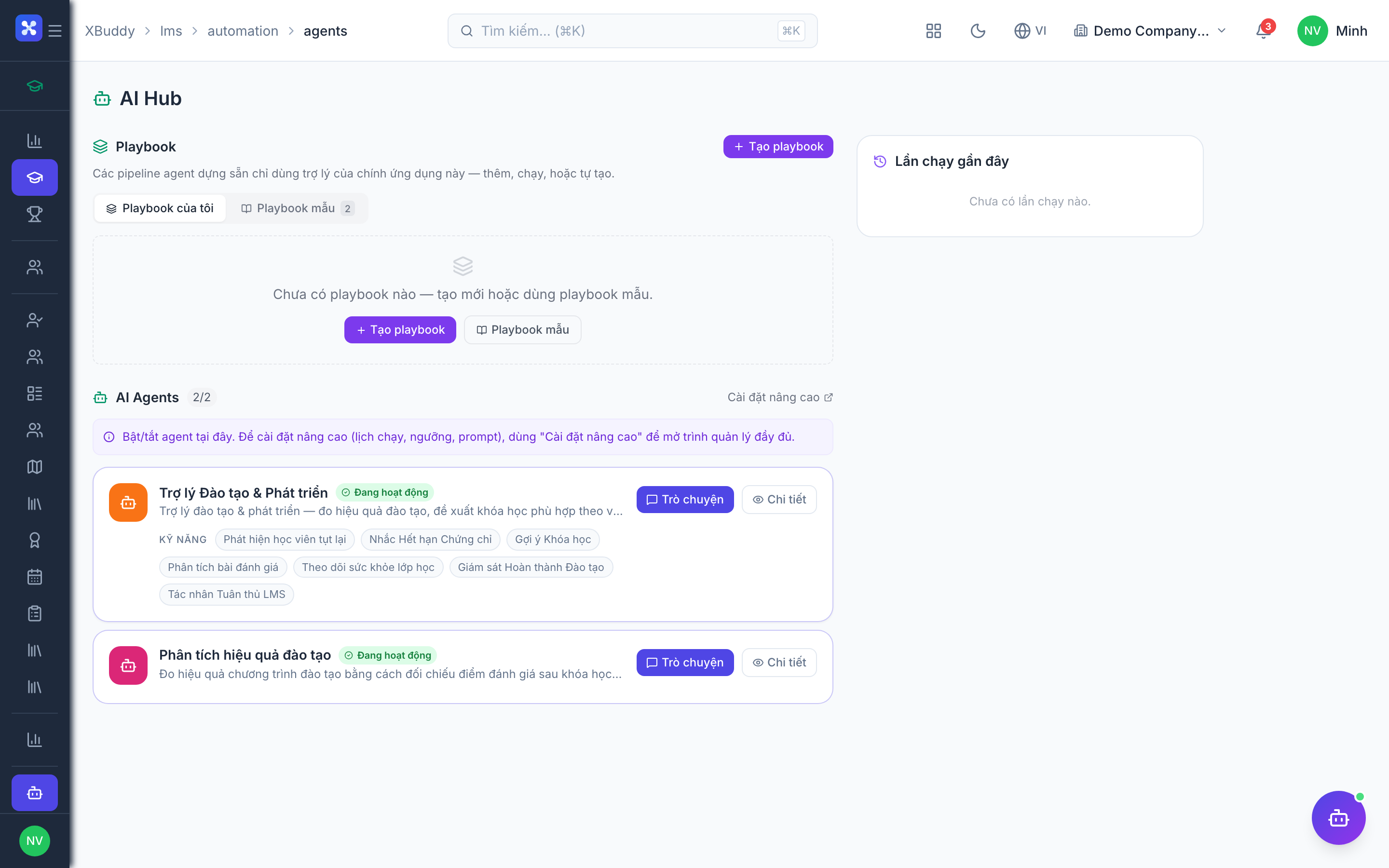
- AI Hub agents and Workflows for reminders, escalations, and roll-over
Important features
Authoring courses and learning paths
A course is the unit of training; a learning path chains courses into a program (e.g. new-hire onboarding). Both are built once and reused across enrolments.
Create a course
Go to LMS → Courses (/lms/courses) and click New Course. Add modules by type — video, document, SCORM package, or inline content — and arrange them in order.
Add a knowledge check
Attach an assessment (see below) as a module to gate progress or confirm understanding before completion.
Build a path
Go to LMS → Paths (/lms/paths) and sequence multiple courses into a learning path. Set whether courses must be taken in order and whether the path is mandatory.
Publish
Publish the course or path to the Catalog so it becomes discoverable and enrollable.
Catalog and enrolment rules
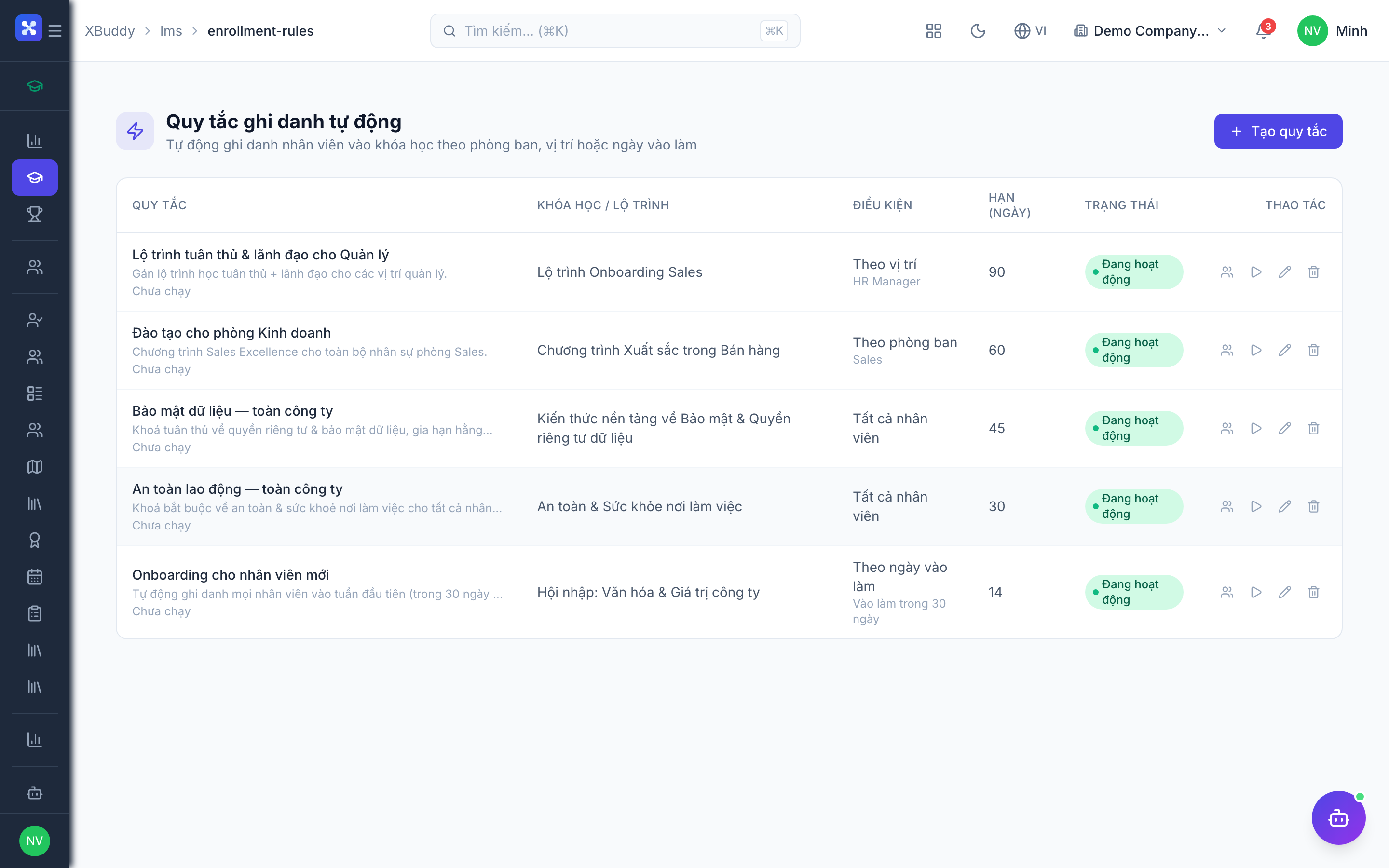
The Catalog is the storefront learners browse; Enrolment Rules automate who gets assigned what, so compliance training reaches the right people without manual work.
Review the catalog
Go to LMS → Catalog (/lms/catalog) to see all published courses and paths. Learners self-enrol here where self-enrolment is allowed.
Create an enrolment rule
Go to LMS → Enrollment Rules (/lms/enrollment-rules) and define a rule — for example, “all new Sales hires are enrolled in the Sales Onboarding path within 7 days of start date”.
Let the rule run
The rule auto-enrols matching learners on a schedule; new hires and role changes trigger fresh enrolments automatically.
Assessments and the question bank
Assessments verify learning; the Question Bank stores reusable questions so you build a test from a pool rather than re-writing questions each time.
Build the question bank
Go to LMS → Question Bank (/lms/question-bank) and add questions (multiple choice, true/false, multi-select) grouped by topic, each with correct answers and points.
Assemble an assessment
Go to LMS → Assessments (/lms/assessments) and create an assessment, drawing questions from the bank. Set the pass mark, time limit, and number of attempts.
Attach and grade
Attach the assessment to a course as a module. Auto-graded questions score instantly; results feed completion status and the learner’s profile.
Instructor-led sessions
ILT Sessions handle scheduled, live training — classroom or virtual — with attendance that counts toward course completion.
Schedule a session
Go to LMS → Sessions (/lms/sessions) and create a session with a date, location or link, instructor, and capacity.
Enrol attendees
Add attendees directly, or link the session to a course so enrolled learners can register.
Record attendance
After the session, mark attendance. Present learners have the linked course marked complete, triggering certificates where configured.
Certificates, badges, and gamification
Certificates prove completion (with expiry for recurring compliance); badges and the leaderboard drive engagement.
Configure certificates
Go to LMS → Certificates (/lms/certificates) to review issued certificates and their templates. Set an expiry period on compliance courses so re-certification is required.
Set up badges
Go to LMS → Badges (/lms/badges) to define badges awarded for completing paths, streaks, or high assessment scores.
Watch the leaderboard
Go to LMS → Leaderboard (/lms/leaderboard) to see points earned across the organization, driving friendly competition and engagement.
For compliance training (safety, regulatory), always set a certificate expiry. When a certificate lapses, Enrolment Rules and the Learning Coordinator agent re-enrol the learner so nobody drifts out of compliance silently.
Full feature reference
| Nav item | Path | What it does |
|---|---|---|
| Overview | /lms | KPI dashboard — active learners, completion rate, overdue compliance, upcoming sessions |
| Catalog | /lms/catalog | Browse and self-enrol in published courses and paths |
| My Learning | /lms/my-learning | The learner’s assigned and in-progress courses |
| My Submissions | /lms/my-submissions | The learner’s assessment attempts and results |
| Leaderboard | /lms/leaderboard | Organization-wide points ranking |
| Team | /lms/team | Manager view of team completion and overdue compliance |
| Learners | /lms/learners | Learner registry with per-learner profiles and history |
| Courses | /lms/courses | Author and publish courses from mixed content and SCORM |
| Paths | /lms/paths | Sequence courses into structured learning paths |
| Certificates | /lms/certificates | Issued certificates, templates, and expiry management |
| Sessions | /lms/sessions | Instructor-led (ILT) session scheduling and attendance |
| Assessments | /lms/assessments | Build quizzes and tests with pass marks and attempts |
| Question Bank | /lms/question-bank | Reusable pool of questions grouped by topic |
| Reports | /lms/reports | Completion, compliance, and assessment performance reports |
| AI Hub | /lms/ai-hub | AI agents scoped to learning and compliance |
| Workflows | /lms/workflows | Automation for reminders, escalations, and re-enrolment |
| Enrollment Rules | /lms/enrollment-rules | Auto-assign training by role, department, or hire date |
| Badges | /lms/badges | Define gamification badges and award criteria |
| Settings | /lms/settings | Catalog visibility, SCORM, certificate templates, and gamification toggles |
Integration points
| Integrates with | Direction | What flows |
|---|---|---|
| HR | Inbound | Employee records, roles, departments, and hire dates drive enrolment rules and compliance targets |
| Performance | Bidirectional | Course completions and skills feed development plans; performance gaps trigger training recommendations |
| Self-Service | Outbound | Employees see assigned training, certificates, and progress in their self-service portal |
Related AI agents
| Agent | What it does |
|---|---|
| Learning Coordinator | Tracks compliance-training status, re-enrols learners on lapsed certificates, nudges overdue courses, recommends courses to close skill gaps, and summarises team learning progress |
Common workflows
Onboarding a new hire
- Build a “New Hire Onboarding” learning path in Paths from the required courses.
- Create an Enrolment Rule that assigns the path to new employees within N days of their start date.
- The learner completes courses in My Learning; certificates issue on completion and appear in Self-Service.
Recurring compliance cycle
- Author the compliance course and set a certificate expiry (e.g. 12 months).
- When a certificate approaches expiry, the Learning Coordinator re-enrols the learner automatically.
- Managers monitor overdue status in Team and Reports, escalating via Workflows if needed.
Running an instructor-led workshop
- Schedule an ILT Session with instructor, date, and capacity, linked to a course.
- Learners register from the Catalog; the instructor records attendance afterward.
- Present learners have the course completed and receive the certificate and badge.
FAQ
Does the LMS support SCORM? Yes — SCORM 1.2 packages upload as course modules and report completion and scores back to the LMS like any other module.
What’s the difference between a course and a learning path? A course is a single unit of training. A learning path chains multiple courses into a program, optionally enforcing order and marking the whole path mandatory.
How do overdue and lapsed certificates get handled? Compliance courses with a certificate expiry trigger re-enrolment through Enrolment Rules and the Learning Coordinator agent, so learners are re-assigned before or when their certificate lapses.
Can managers see who hasn’t completed training? Yes. The Team view and Reports show per-learner completion and overdue compliance across a manager’s reports.
Where do learners find their certificates? In LMS → Certificates and in their Self-Service portal, which mirrors assigned training, progress, and issued certificates.