Service Management
XBuddy Service Management runs the delivery side of a services business — from the support ticket a customer opens, through the service contract and orders that govern the work, to the agent timesheets that get billed and the SLAs that hold the whole thing to a standard. It gives service teams one place to capture demand, deliver work, meet commitments, and turn effort into invoices.
Who uses it: support agents resolving tickets, service managers overseeing contracts and SLA compliance, delivery agents logging billable time, and finance users billing against delivered service. Because tickets, contracts, and timesheets all connect to the same customer and service catalog, nothing has to be re-entered to bill for it.
Key Features
- Ticket lifecycle with a customer portal and activity timeline
- Service Contracts governing ongoing service relationships
- Service Orders for specific pieces of billable work
- Service Catalog of standard service offerings and rates
- Agent Timesheets captured against tickets/orders and rolled into Billing
- SLA Policies and SLA reporting for response/resolution commitments
- Reports on ticket volume, agent utilization, and SLA compliance
- AI Hub with the Support Concierge assistant
Important features
Ticket lifecycle + portal
A ticket is a customer’s support request. It moves through a lifecycle (open → in progress → resolved), keeps a full activity timeline, and can be viewed by the customer through a secure portal link without a login.
Create or receive a ticket
Go to Service Management → Tickets and open a ticket (or one arrives from a connected email channel or the portal).
Work it
Assign an agent, respond, add internal notes, and progress the status. Every action lands on the ticket timeline.
Share the portal
Send the customer the portal link; they can follow status and reply without an account. Responses log back onto the ticket.
Service contracts & orders
A Service Contract governs an ongoing relationship (scope, rates, term); a Service Order is a specific, billable engagement — often created under a contract — that the team delivers.
Set up a contract
Go to Service Management → Service Contracts → New Contract, define the scope, rates, and term with the customer.
Raise a service order
From the contract (or standalone), create a Service Order under Service Management → Service Orders describing the work to deliver.
Deliver and close
Agents log time against the order; when work completes, the order is ready for billing.
Timesheets → billing
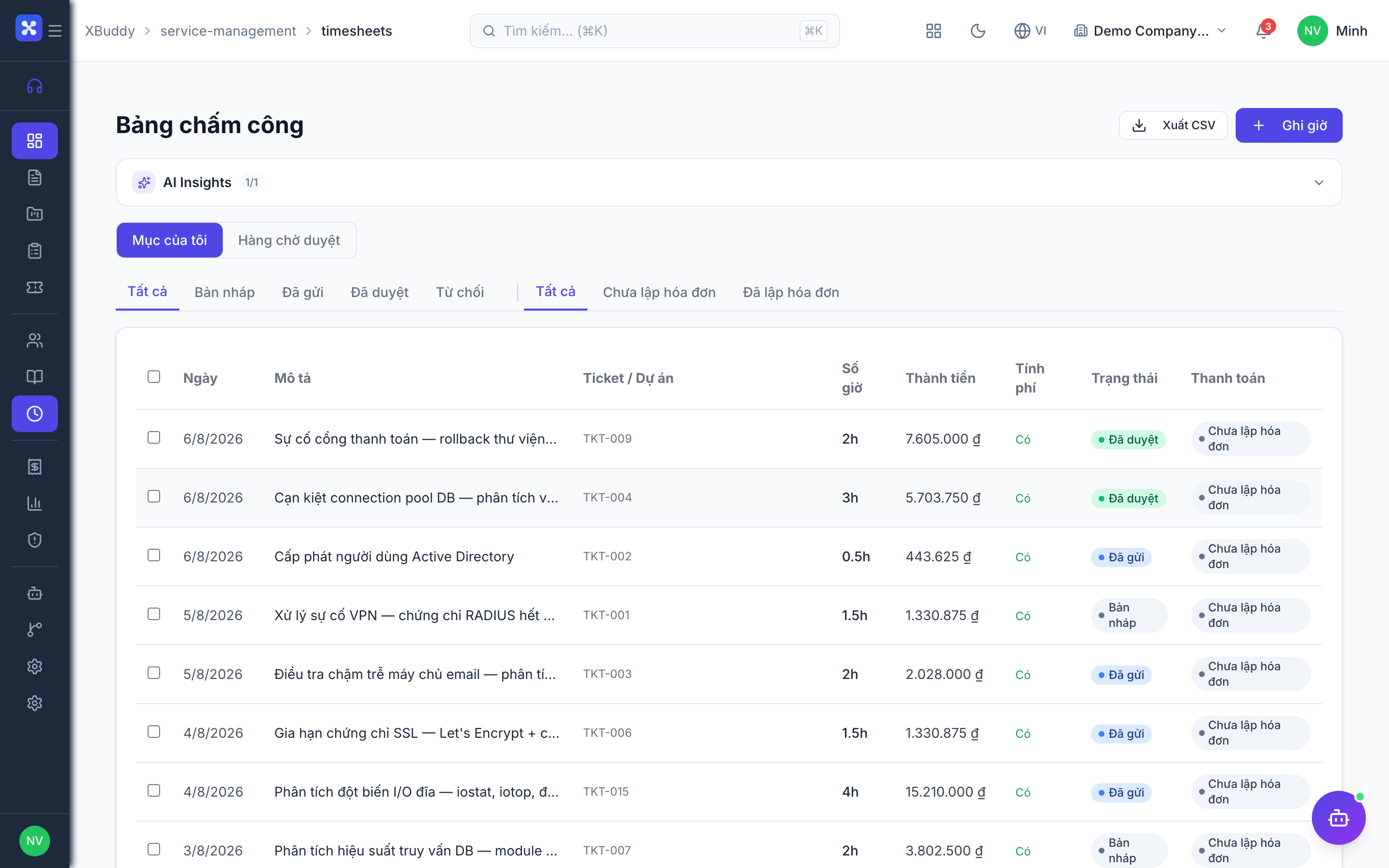
Agents log billable time against tickets or service orders; those hours roll up into Billing, which turns delivered effort into an invoice — no re-keying of what was done.
Log time
Agents record hours under Service Management → Timesheets, tagged to the ticket or service order and the service catalog rate.
Review for billing
A manager opens Service Management → Billing, reviews the unbilled time and orders, and confirms what to invoice.
Generate the invoice
Billing generates a customer invoice in Finance with the billable hours and rates pre-filled.
The four billing models
Pick the flow that matches the engagement — all four converge on the Billing queue, where a reviewer turns staged items into a draft Finance invoice with one click. Nothing is invoiced automatically.
| Model | How you sell it | How it gets billed |
|---|---|---|
| One-off service | Quotation → Service Order | Invoice directly from the service order (partial invoicing supported) |
| Fixed-price project | Service Order + Contract + Project with priced milestones | Complete a milestone → stage it in Billing → generate the invoice for that phase |
| Time & material | Contract (T&M) + timesheets | Approve billable timesheets → stage them → generate a consolidated invoice (hours × rate) |
| Retainer / recurring | Contract (retainer) with a billing cycle | Each cycle the system stages one billing event automatically (enable Recurring Retainer Billing in Settings → Service Features → Billing); review and invoice it |
Field work is dispatched from the service order to Field Service, which handles technician scheduling, parts, and customer acceptance.
SLA policies & reporting
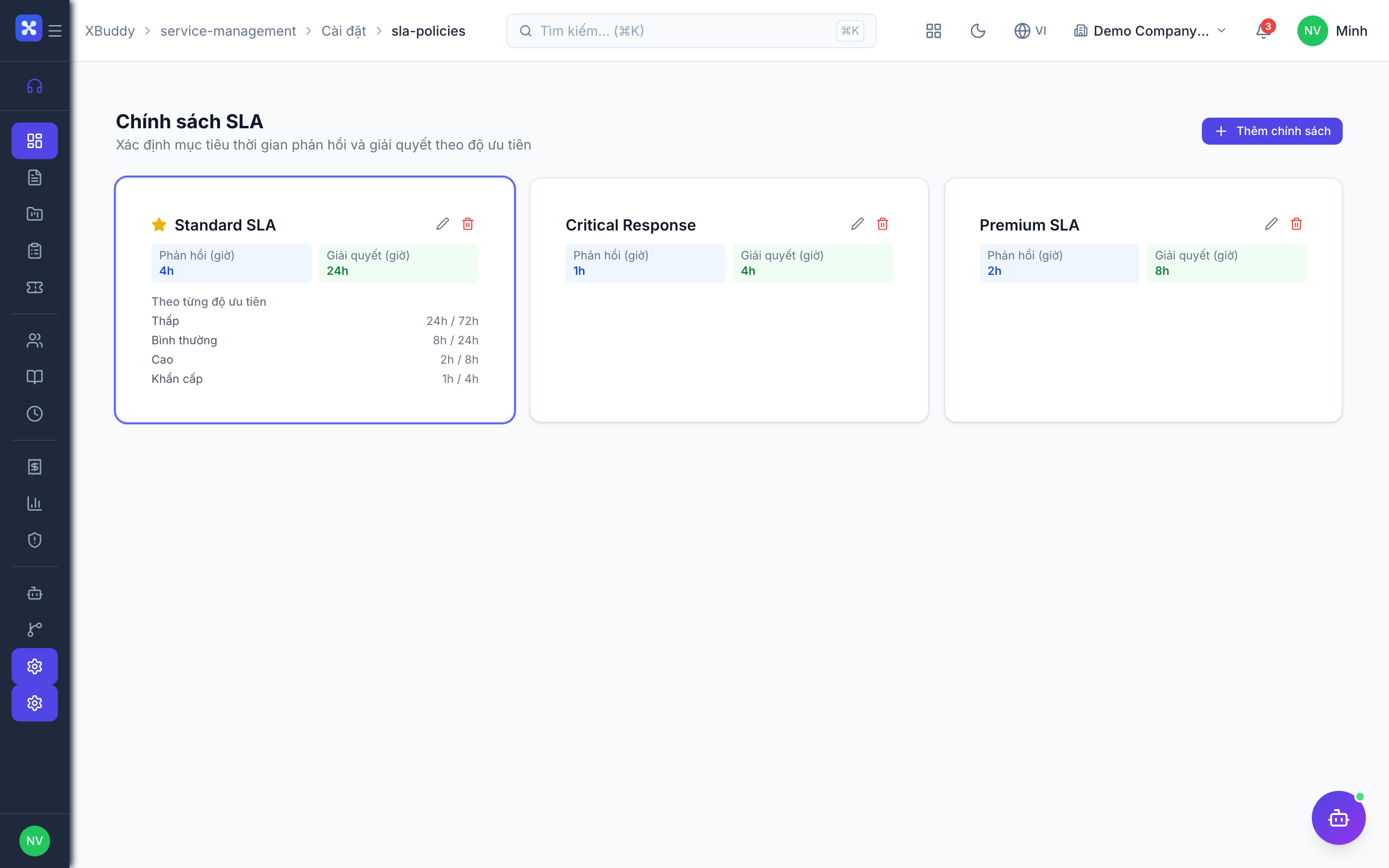
SLA policies set response and resolution deadlines by priority; the SLA report shows compliance so managers can catch and escalate at-risk work before a commitment is breached.
Define a policy
Go to Service Management → SLA Policies → New Policy and set response/resolution targets per priority level.
Apply it to tickets
Tickets inherit the deadline for their priority and display time remaining against it.
Monitor the SLA Report
Open Service Management → SLA Report to see met, at-risk, and breached items, and escalate before deadlines slip.
Full feature reference
| Nav item | What it does |
|---|---|
| Overview | Service dashboard with open tickets, SLA compliance, agent utilization, and a chart of ticket volume by period. |
| Tickets | Support request workspace with lifecycle, assignment, internal notes, customer portal, and activity timeline. |
| Projects | Service delivery projects grouping related orders/tickets and tracking progress toward a larger engagement. |
| Service Contracts | Ongoing service agreements defining scope, rates, and term that govern service orders and billing. |
| Service Orders | Specific billable engagements (often under a contract) describing work to deliver, with linked timesheets. |
| Service Agents | Registry of delivery/support agents, their assignments, and utilization. |
| Service Catalog | Standard service offerings with rates, used to price orders and timesheet lines consistently. |
| Timesheets | Billable time logged by agents against tickets/orders at catalog rates, feeding billing. |
| Billing | Reviews unbilled timesheets and orders and generates customer invoices in Finance. |
| Reports | Service reporting hub: ticket volume, resolution time, agent utilization, and revenue with CSV export. |
| SLA Report | Compliance report showing met, at-risk, and breached SLA commitments across tickets. |
| SLA Policies | Definitions of response/resolution deadlines by priority, applied to tickets. |
| AI Hub | Run the Support Concierge assistant and review its triage and resolution suggestions. |
| Workflows | Automation for service events — e.g. auto-assign a ticket by category or alert on an SLA-breach risk. |
| Settings | Configure SLA policies, service catalog rates, portal branding, data scope, and service master data. |
Integration points
| Connects to | How the data flows |
|---|---|
| CRM | Tickets, contracts, and orders reference the CRM account, giving one view of the customer’s service history. |
| Finance | Reviewed timesheets and completed orders generate customer invoices with hours and rates pre-filled. |
| Field Service | On-site work dispatched from tickets/orders flows to the Field Service app and reports completion back. |
| Customer Success | Tickets and SLAs align with the CS support pipeline for a unified post-sale experience. |
| Communications | Connected email/chat channels create and update tickets and log customer replies automatically. |
Related AI agents
| Agent | What it does |
|---|---|
| Support Concierge | Triages incoming tickets, drafts responses, flags SLA-breach risk, and suggests the next resolution step to the agent. |
Common workflows
1. Ticket to resolution
- A ticket arrives in Tickets (portal, email, or manual) and inherits its SLA policy.
- An agent is assigned; the Support Concierge drafts a response.
- The agent works the ticket, logging Timesheets for billable time.
- On resolution, the ticket closes and its billable time flows to Billing.
2. Contract to invoice
- Set up a Service Contract with scope and rates.
- Raise Service Orders under the contract; agents deliver and log time.
- Review unbilled time and orders in Billing.
- Generate the customer invoice in Finance with hours and rates pre-filled.
3. Keep SLAs green
- Define SLA Policies with response/resolution targets by priority.
- Tickets inherit deadlines and show time remaining.
- Watch the SLA Report; escalate at-risk items before they breach.
FAQ
What’s the difference between a Service Contract and a Service Order? A Service Contract governs the ongoing relationship (scope, rates, term). A Service Order is a specific, billable piece of work — usually raised under a contract — that the team delivers and bills.
How do agent hours become an invoice? Agents log Timesheets against tickets/orders at service-catalog rates. Billing reviews the unbilled time and generates a customer invoice in Finance with those hours and rates — no re-keying.
Can customers see their ticket without an account? Yes. Each ticket has a secure portal link the customer can use to follow status and reply; their responses log back onto the ticket automatically.
How are SLAs enforced? An SLA Policy sets response and resolution deadlines by priority. Tickets inherit the deadline and show time remaining; the SLA Report flags at-risk and breached items so managers escalate in time.
Does on-site work connect to Field Service? Yes. Work that requires a technician on location is dispatched to the Field Service app and reports its completion back to the originating ticket or order.
Where do standard rates come from? The Service Catalog holds standard offerings and their rates, so orders and timesheet lines are priced consistently across the team.