Asset Management
XBuddy Asset Management tracks every physical asset — equipment, vehicles, IT hardware, and infrastructure — from acquisition through disposal. It maintains a single asset register organized by category and location, runs preventive maintenance on a schedule with work orders, records who holds each asset and where it moves, and links financial value straight into Accounting so depreciation and the asset register never drift apart.
Who uses it: asset and facilities managers keeping the register accurate, maintenance teams executing preventive and corrective work orders, finance owners reconciling asset value and depreciation, and department heads who hold assigned equipment. Asset Management connects Procurement (a PO becomes an asset), Accounting (fixed-asset and depreciation journals), and Field Service (technicians servicing assets).
An asset acquired through Procurement flows PO → goods receipt → asset → fixed asset → journal entry. The document chain keeps the operational asset and its accounting value linked, so the register and the ledger stay in sync.
Key Features
- Central asset register with categories, locations, and full lifecycle status
- Preventive maintenance schedules that auto-generate work orders
- Maintenance work orders for corrective and scheduled repairs
- Asset assignments — who holds what, and check-in/check-out
- Transfers of assets between locations or departments
- Physical asset audits to reconcile register vs. reality
- Depreciation tracking linked to Accounting fixed assets
- Procurement-to-asset creation (PO/GRN → asset → fixed asset)
- Reporting on asset value, maintenance cost, and utilization with CSV export
- AI-assisted maintenance and asset-health suggestions
Important features
Asset register, categories & locations
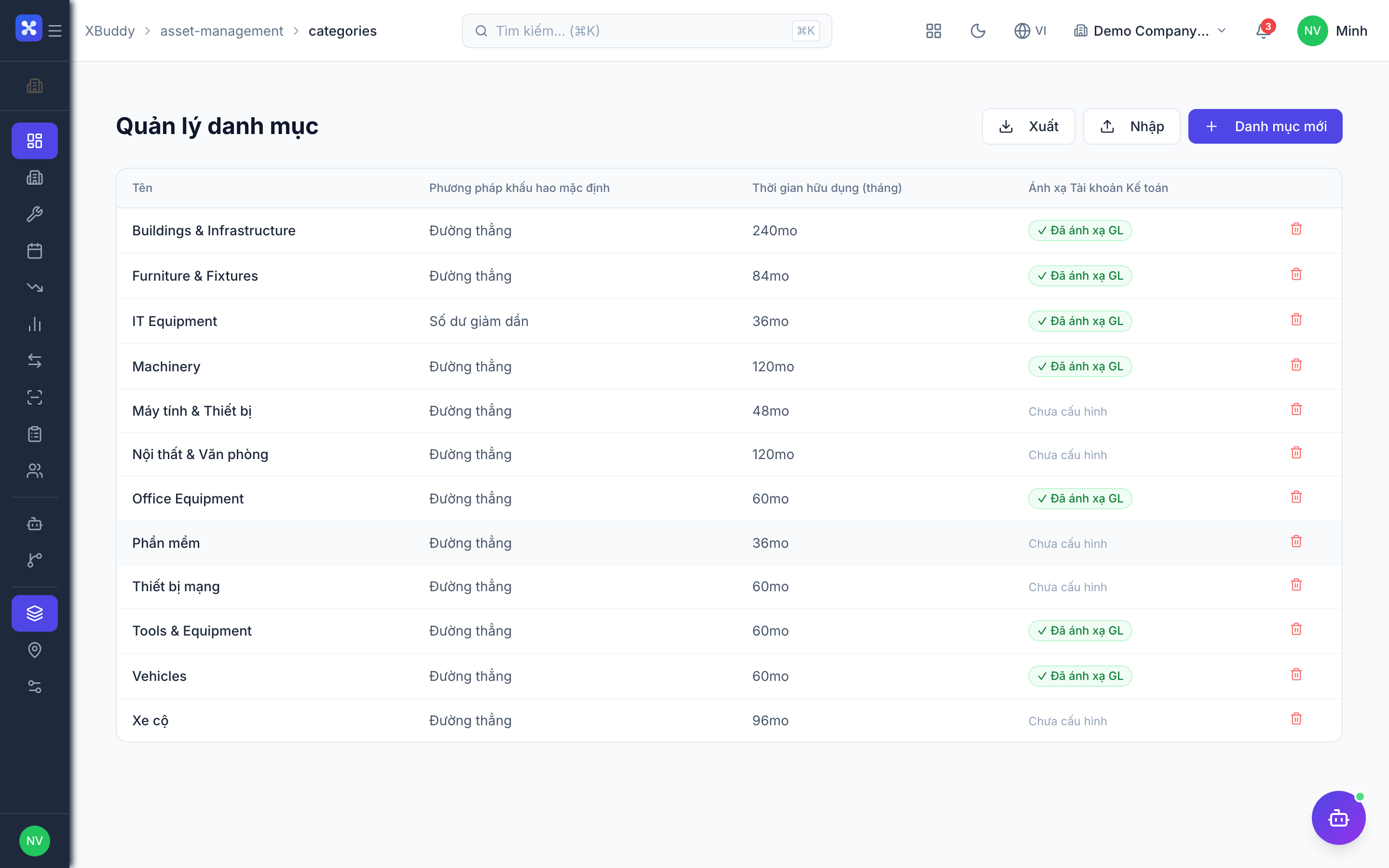
The register is the master list of every asset. Categories group assets by type (with defaults like depreciation method), and locations describe where each asset physically sits.
Set up categories and locations
Go to Asset Management → Asset Categories to define asset types, then Asset Locations to build your site/room/zone structure.
Add an asset
Go to Asset Management → Asset Register → New Asset. Set its category, location, acquisition cost, and lifecycle status.
Link the source document
If the asset came from a purchase, link its PO/goods receipt so the acquisition value and document chain are captured.
Preventive maintenance schedule & work orders
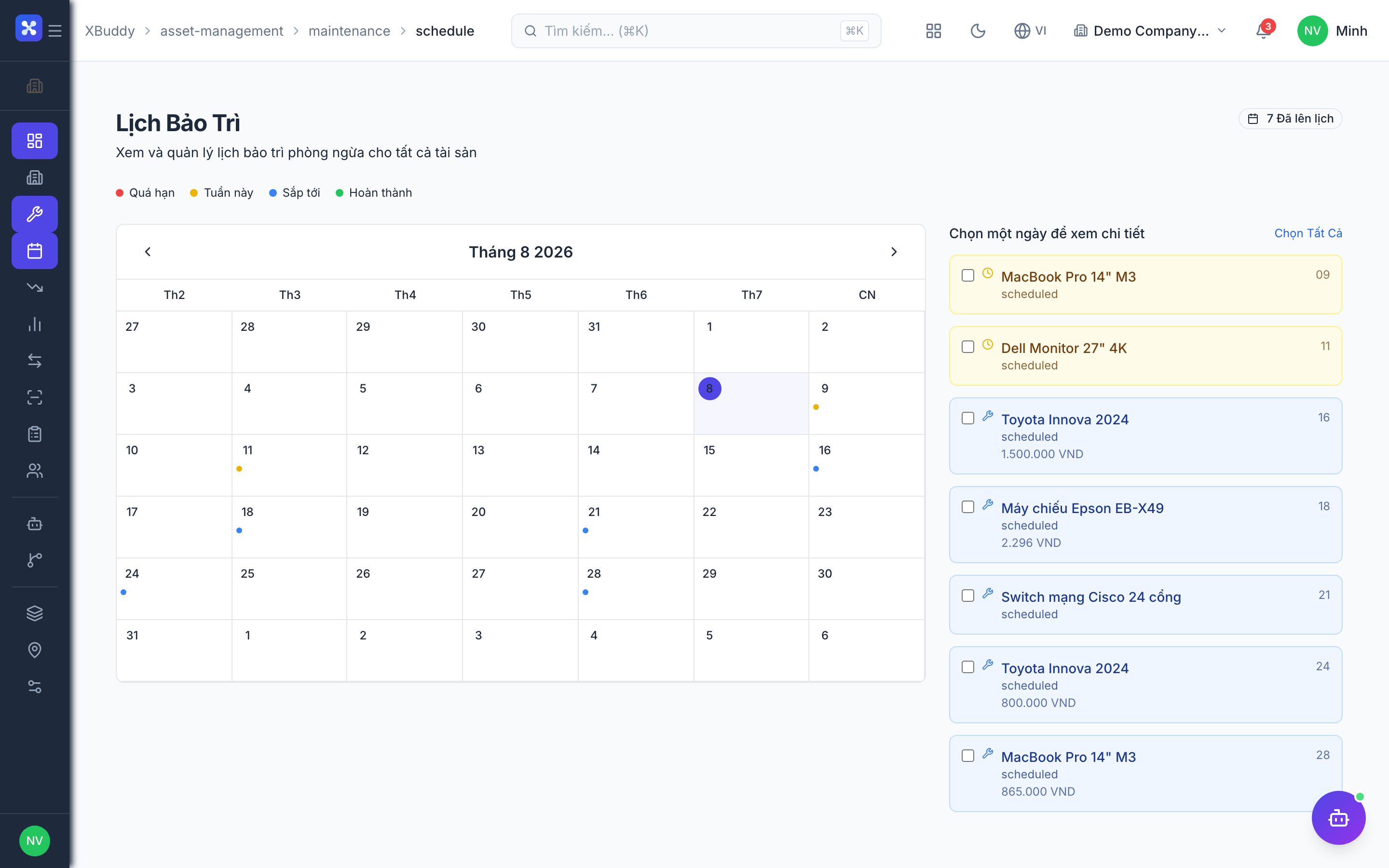
Maintenance keeps assets running. A schedule defines recurring service (by time or usage) and automatically raises work orders, which the maintenance team executes and closes.
Define a schedule
Go to Asset Management → Maintenance Schedule → New Schedule, pick the asset (or category), and set the interval and checklist.
Auto-generate work orders
When a schedule is due, XBuddy raises a maintenance work order in Asset Management → Work Orders and assigns it.
Execute and close
The team completes the work order, logs parts and labor, and closes it — the cost rolls up against the asset.
Assignments & transfers
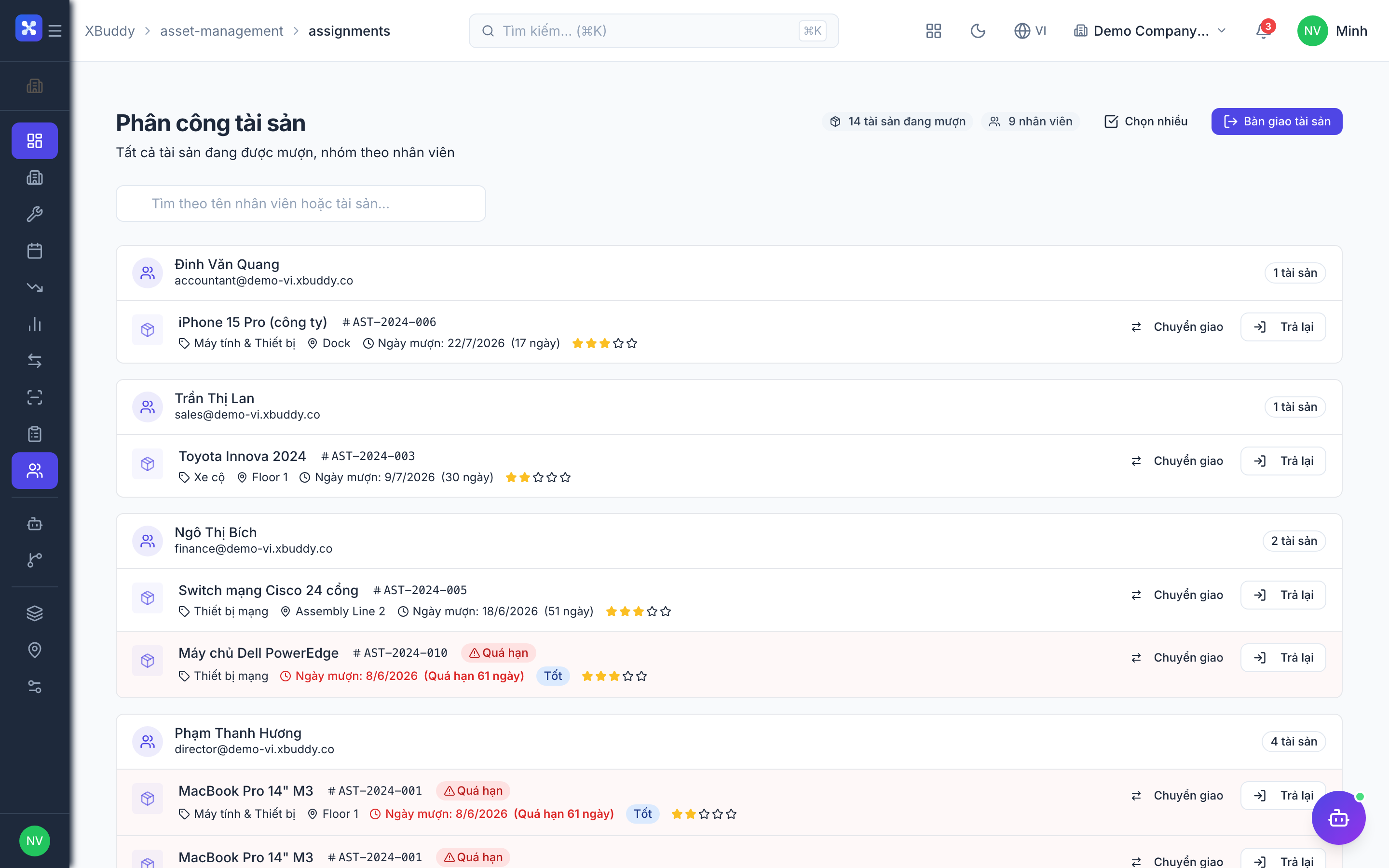
Assignments record who currently holds an asset; transfers move an asset between locations or departments. Together they answer “where is it and who has it” at any moment.
Assign an asset
Go to Asset Management → Assignments → New Assignment, choose the asset and the holder (employee/department), and check it out.
Transfer between locations
Use Asset Management → Transfers to move an asset to a new location or owner; the register updates and the movement is logged.
Check in on return
When the asset comes back, check it in from Assignments so it’s available again.
Depreciation
Depreciation spreads an asset’s cost over its useful life. Asset Management links each asset to its fixed-asset record in Accounting so depreciation runs post journals against the right ledger accounts.
Set the depreciation basis
On the asset (or its category), set the method, useful life, and salvage value.
Track depreciation
Go to Asset Management → Depreciation to see accumulated depreciation and net book value per asset.
Post to Accounting
Depreciation runs post journal entries so the register value and the general ledger stay aligned.
Asset audits
An audit reconciles what the register says against what is physically present. It surfaces missing, misplaced, or unrecorded assets so the register stays trustworthy.
Start an audit
Go to Asset Management → Audit → New Audit and scope it to a location or category.
Verify each asset
Confirm presence and condition; discrepancies are flagged for follow-up.
Reconcile
Resolve differences — update location, mark disposed, or investigate — and close the audit.
Full feature reference
| Nav item | What it does |
|---|---|
| Overview | Asset dashboard with total asset value, maintenance due, utilization, and lifecycle-status KPIs. |
| Asset Register | Master list of every asset with category, location, cost, status, and linked source documents. |
| Maintenance | Maintenance activity workspace — corrective and scheduled service records with cost tracking. |
| Maintenance Schedule | Recurring preventive-maintenance definitions that auto-generate work orders by time or usage. |
| Depreciation | Per-asset depreciation, accumulated depreciation, and net book value, linked to Accounting fixed assets. |
| Reports | Asset reporting: value, maintenance cost, utilization, and audit results with CSV export. |
| Transfers | Movement of assets between locations or departments, logged against the register. |
| Audit | Physical asset audits reconciling the register against on-site reality. |
| Work Orders | Maintenance work orders (corrective and scheduled) with parts, labor, and closure. |
| Assignments | Check-in/check-out of assets to employees or departments — who holds what. |
| Asset Categories | Asset type definitions with defaults such as depreciation method and useful life. |
| Asset Locations | Site/room/zone structure that assets are placed and tracked against. |
| AI Hub | Run asset AI assistants (Asset Manager) and review maintenance and health suggestions. |
| Workflows | Automation for asset events — maintenance-due alerts, assignment approvals, or audit reminders. |
| Settings | Configure categories, depreciation defaults, permissions/data scope, and asset master data. |
Integration points
| Connects to | How the data flows |
|---|---|
| Accounting | Assets link to fixed-asset records; acquisition and depreciation post journal entries so register value matches the ledger. |
| Procurement | A purchase order and its goods receipt can create an asset (PO → GRN → asset → fixed asset) with a linked document chain. |
| Field Service | Assets requiring on-site service generate field-service jobs; technicians service the asset and log the work back. |
| Workflow | Asset events (maintenance due, transfer, audit finding) can trigger notifications, approvals, and downstream actions. |
Related AI agents
| Agent | What it does |
|---|---|
| Asset Manager | Watches maintenance schedules, asset utilization, and lifecycle status, and proposes maintenance work orders and disposal decisions. |
Common workflows
1. From purchase to tracked asset
- Procurement approves a purchase order for equipment.
- Goods arrive and a goods receipt is recorded in Inventory.
- An asset is created from the PO/GRN in Asset Management → Asset Register, linked as a document chain.
- The asset links to a fixed asset in Accounting; acquisition and future depreciation post to the ledger.
2. Preventive maintenance cycle
- A maintenance schedule falls due for an asset.
- XBuddy auto-raises a work order in Work Orders and assigns it.
- The team executes the service, logs parts and labor, and closes the work order.
- Cost rolls up against the asset and appears in Reports.
3. Assign, transfer, and audit
- Assign an asset to an employee via Assignments (check-out).
- When the asset moves, record a Transfer to the new location/owner.
- During an Audit, verify the asset is present at its recorded location.
- Resolve any discrepancy and close the audit so the register stays accurate.
FAQ
How does an asset get its accounting value? Assets link to a fixed-asset record in Accounting. Acquisition (often from a PO/GRN) and depreciation post journal entries, keeping the register and the ledger in sync.
What’s the difference between Maintenance and Maintenance Schedule? The Schedule defines recurring preventive service that auto-generates work orders; Maintenance (and Work Orders) is where that scheduled — and any corrective — service is actually executed.
How do I know who has an asset? Assignments records the current holder via check-out/check-in, and Transfers logs every movement between locations or departments.
What does an audit do? It reconciles the register against physical reality — confirming presence and condition, and flagging missing or misplaced assets for follow-up.
Where does depreciation post? Depreciation runs generate journal entries against the fixed-asset accounts in Accounting, so net book value in the register matches the general ledger.
Can maintenance be done by field technicians? Yes. Assets needing on-site work can generate Field Service jobs; the technician services the asset and the work is logged back against it.