Customer Success
XBuddy Customer Success is the retention engine for your existing customer base. It scores account health, tracks upcoming renewals, measures satisfaction with NPS, structures onboarding, and drives repeatable retention motions through playbooks — while also handling support tickets and the SLAs that govern them. The goal: see churn coming and act before revenue slips.
Who uses it: CS managers owning the renewal number, CSMs running onboarding and playbooks, support agents resolving tickets, and revenue leaders tracking retention. Because health, renewals, and tickets all reference the same CRM account, one customer’s full post-sale story lives in a single place.
Key Features
- Customer Health scoring that combines usage, engagement, and support signals
- Renewals pipeline with dates, values, and risk flags
- NPS Tracking for satisfaction surveys and trend
- Structured Onboarding with reusable templates
- CS Playbooks — repeatable retention motions with tracked Playbook Runs
- Tickets and SLA Management for support commitments
- Reports on retention, health distribution, and SLA compliance
- AI Hub with the CS Guardian and Support Concierge assistants
Important features
Customer Health scoring
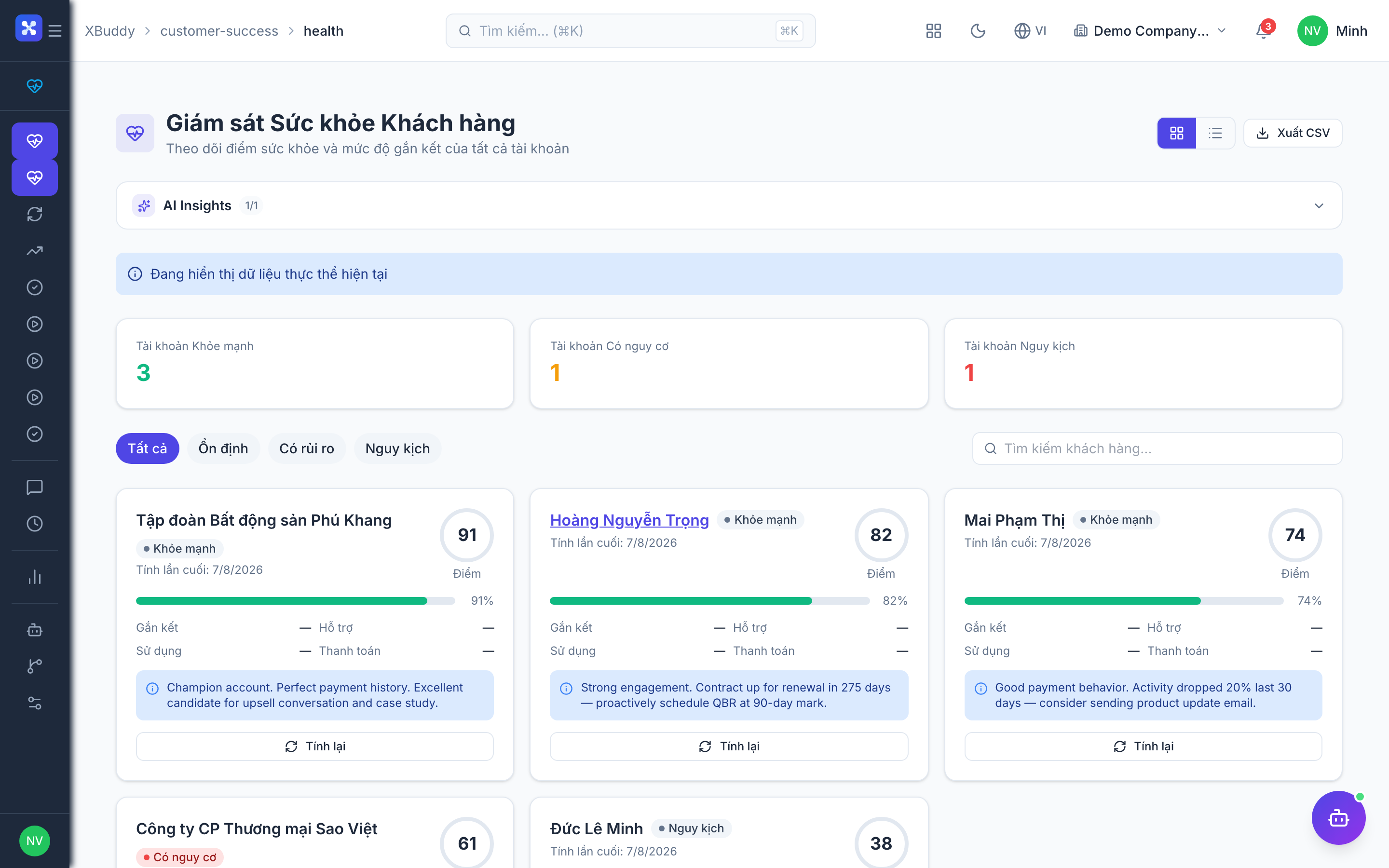
A health score summarizes whether an account is thriving or at risk by blending signals — product usage, engagement recency, open tickets, and payment behavior — into one trend you can act on.
Open the health board
Go to Customer Success → Customer Health. Each account shows its current score, trend arrow, and the signals driving it.
Drill into an account
Click an account to see its health history and the specific factors pulling the score up or down.
Act on risk
Low or declining scores surface a recommended play; the CS Guardian agent can propose a retention action inline on the account.
Renewals pipeline
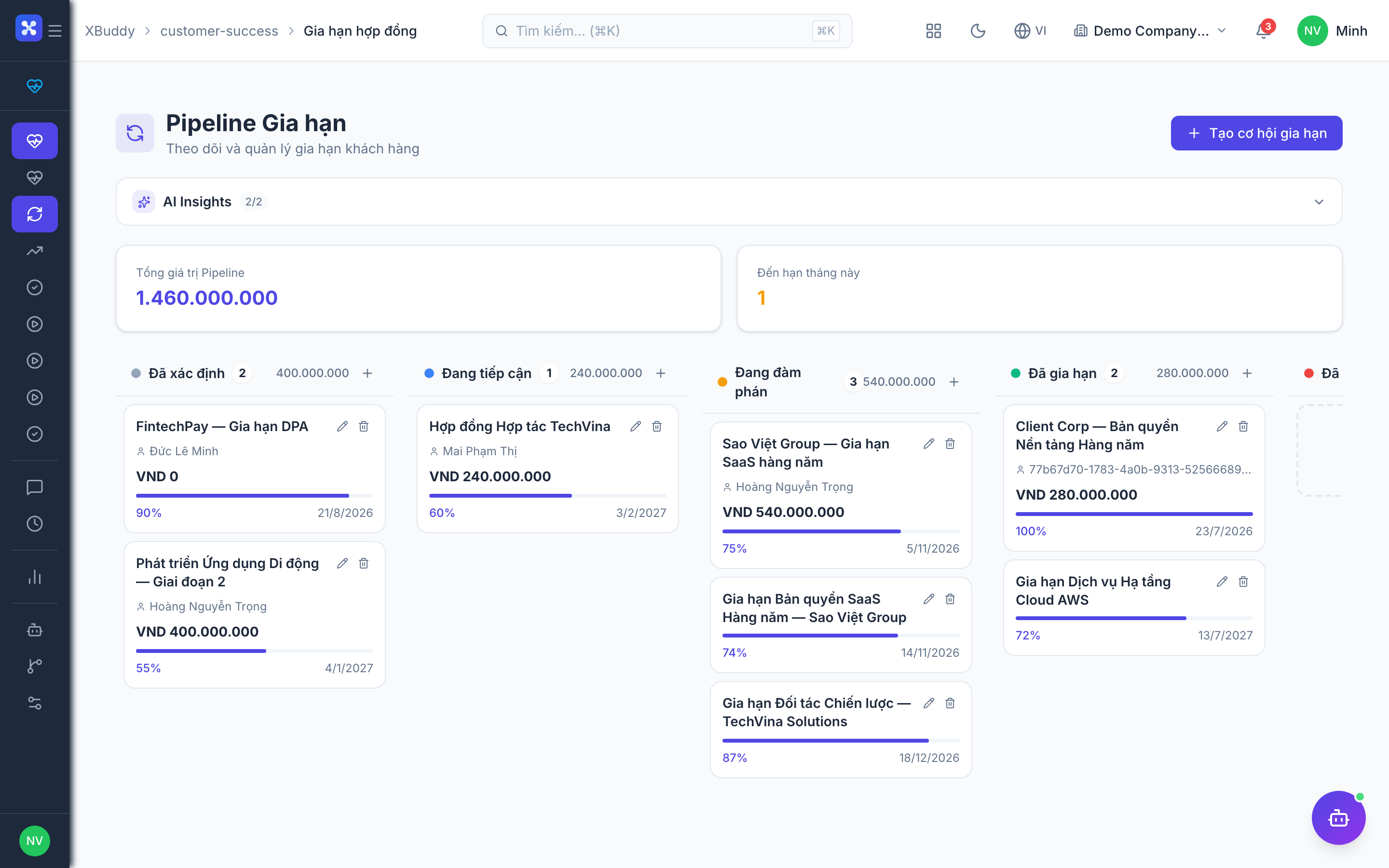
The renewals pipeline lists every upcoming contract renewal with its date, value, and risk, so nothing lapses silently and at-risk renewals get attention early.
Review upcoming renewals
Go to Customer Success → Renewals. Filter by month or owner to see what’s due and its value.
Prioritize by risk
Renewals inherit the account’s health signal; work the high-value, low-health ones first.
Close the renewal
Progress the renewal to renewed (generating the follow-on contract/invoice in Finance) or record a churn reason if lost.
Onboarding & templates
Onboarding turns a new customer’s first weeks into a tracked, repeatable process using templates so every customer gets a consistent start.
Start from a template
Go to Customer Success → Onboarding Templates, pick a template, and launch an onboarding plan for the new account.
Work the steps
The plan appears under Customer Success → Onboarding with milestones and owners; check off steps as they complete.
Graduate to steady state
When onboarding finishes, the account transitions to normal health tracking and its assigned playbooks.
CS Playbooks & runs
Playbooks are reusable retention motions — a sequence of steps triggered by a signal (e.g. “health dropped below 50”). A Playbook Run is one execution of a playbook against a specific account, tracked to completion.
Build a playbook
Go to Customer Success → Playbook Templates → New Template and define the trigger and ordered steps.
Launch a run
When a matching signal fires (or manually), start a Playbook Run on the account under Customer Success → CS Playbooks.
Track completion
Monitor active runs in Customer Success → Playbook Runs; each step is owned and checked off, giving a consistent retention motion.
Tickets & SLA Management
Tickets capture support requests; SLA policies define the response/resolution commitments, and SLA Management tracks whether those commitments are being met.
Handle a ticket
Go to Customer Success → Tickets, open a ticket, respond, and progress it through its lifecycle to resolution.
Apply an SLA policy
SLA policies (from Customer Success → SLA Management) attach response and resolution deadlines by priority; the ticket shows time remaining.
Watch compliance
The SLA report highlights breached or at-risk tickets so managers can escalate before a commitment is missed.
Full feature reference
| Nav item | What it does |
|---|---|
| Dashboard | CS landing view with retention KPIs, health distribution, upcoming renewal value, and open-ticket counts. |
| Customer Health | Account health scoring blending usage, engagement, tickets, and payment into a trended score with drill-down. |
| Renewals | Pipeline of upcoming contract renewals with date, value, and inherited risk; progresses to renewed or churned. |
| NPS Tracking | Net Promoter Score surveys, responses, and trend to gauge satisfaction over time. |
| Onboarding | Live onboarding plans with milestones and owners tracking a new customer’s first weeks. |
| CS Playbooks | Library of retention motions; launch a run against an at-risk account. |
| Playbook Runs | Active and completed executions of playbooks against specific accounts, tracked step-by-step. |
| Playbook Templates | Reusable playbook blueprints defining triggers and ordered steps. |
| Onboarding Templates | Reusable onboarding plan blueprints for a consistent customer start. |
| Tickets | Support request workspace with lifecycle, portal access, and activity timeline per ticket. |
| SLA Management | Define SLA policies (response/resolution deadlines by priority) applied to tickets. |
| Reports | CS reporting hub: retention, health distribution, NPS trend, and SLA compliance with CSV export. |
| AI Hub | Run CS AI assistants (CS Guardian, Support Concierge) and review their retention/support suggestions. |
| Workflows | Automation for CS events — e.g. launch a playbook on a health drop or alert an owner on a lapsing renewal. |
| Settings | Configure health-score weights, SLA policies, playbook triggers, data scope, and CS master data. |
Integration points
| Connects to | How the data flows |
|---|---|
| CRM | Health, renewals, and tickets all reference the same CRM account, giving one continuous customer record from sale onward. |
| Finance | A closed renewal generates the follow-on contract/invoice; retainer and renewal value feed revenue forecasting. |
| Service Management | Tickets and SLAs align with the service-management support pipeline for a unified support experience. |
| Communications | Ticket and survey responses can arrive through connected email/chat channels and log automatically. |
Related AI agents
| Agent | What it does |
|---|---|
| CS Guardian | Watches account health and renewal timing, flags churn risk early, and proposes retention actions inline on the account. |
| Support Concierge | Triages and drafts responses for tickets, spots SLA-breach risk, and suggests the next resolution step. |
Common workflows
1. Catch and rescue a churn risk
- Customer Health flags an account whose score dropped below threshold.
- A matching Playbook launches a Playbook Run on the account.
- The CS Guardian agent proposes a retention action; the CSM works the steps.
- Health recovers or the account is escalated before the renewal date.
2. Onboard a new customer
- Launch an Onboarding Template for the new account.
- Work the milestones in Onboarding with assigned owners.
- On completion, the account moves to steady-state health tracking and its playbooks.
3. Resolve a ticket within SLA
- A ticket arrives in Tickets and inherits its SLA policy deadlines.
- The agent responds and progresses it; the ticket shows time remaining.
- SLA Management flags at-risk tickets so managers escalate before a breach.
FAQ
What goes into the health score? It blends signals such as product usage, engagement recency, open/breached tickets, and payment behavior into a single trended score. The weighting is configurable in Settings.
How are renewals kept from lapsing? Every upcoming renewal appears in the Renewals pipeline with its date and value, and inherits the account’s health signal so at-risk, high-value renewals get attention first.
What’s the difference between a playbook and a run? A Playbook Template is the reusable motion (trigger + steps). A Playbook Run is one execution of that motion against a specific account, tracked to completion.
How do SLAs get applied to tickets? An SLA policy attaches response and resolution deadlines by priority. When a ticket takes that priority, the deadlines apply and the ticket shows time remaining; the SLA report flags breaches.
Does a renewal create the invoice? Progressing a renewal to renewed can generate the follow-on contract and invoice in Finance, keeping the renewal linked to its billing document.
Can support tickets come in by email? Yes. With a connected Communications channel, inbound messages can create or update tickets and log responses automatically.