F&B
XBuddy F&B is the vertical add-on that turns your POS and inventory into a full food-service operation. It ties the kitchen display, menu engineering, recipe-driven ingredient consumption, loyalty, online ordering, and delivery into one loop — so a dish sold at the counter automatically deducts its ingredients from stock, feeds the kitchen queue, and rolls up into food-cost reporting.
Who uses it: restaurant and café owners setting menus and recipes, kitchen staff working the display, cashiers and online channels taking orders, and managers watching throughput, waste, and margin. F&B builds on the POS and Inventory apps rather than replacing them.
F&B is a vertical add-on. It requires the POS and Inventory modules to be active, since orders flow through POS and ingredient depletion posts against Inventory stock.
Key Features
- Kitchen Display System (KDS) showing live order tickets and preparation status
- Menu management with categories, modifiers, combos, and channel-specific pricing
- Recipe cards that map each dish to its ingredients and portions
- Automatic ingredient consumption — selling a dish depletes raw stock via its recipe
- Theoretical vs actual food cost tracking and variance detection
- Loyalty program with points, tiers, and member recognition at the till
- Online ordering storefront capturing web/app orders into the same queue
- Delivery management with driver assignment, status, and dispatch
- Throughput analytics by time slot to spot service bottlenecks
- Waste tracking to reduce over-portioning and spoilage
- Allergen and dietary tagging on menu items
- Reports on food cost %, best/worst sellers, and channel mix
Important features
Working the Kitchen Display
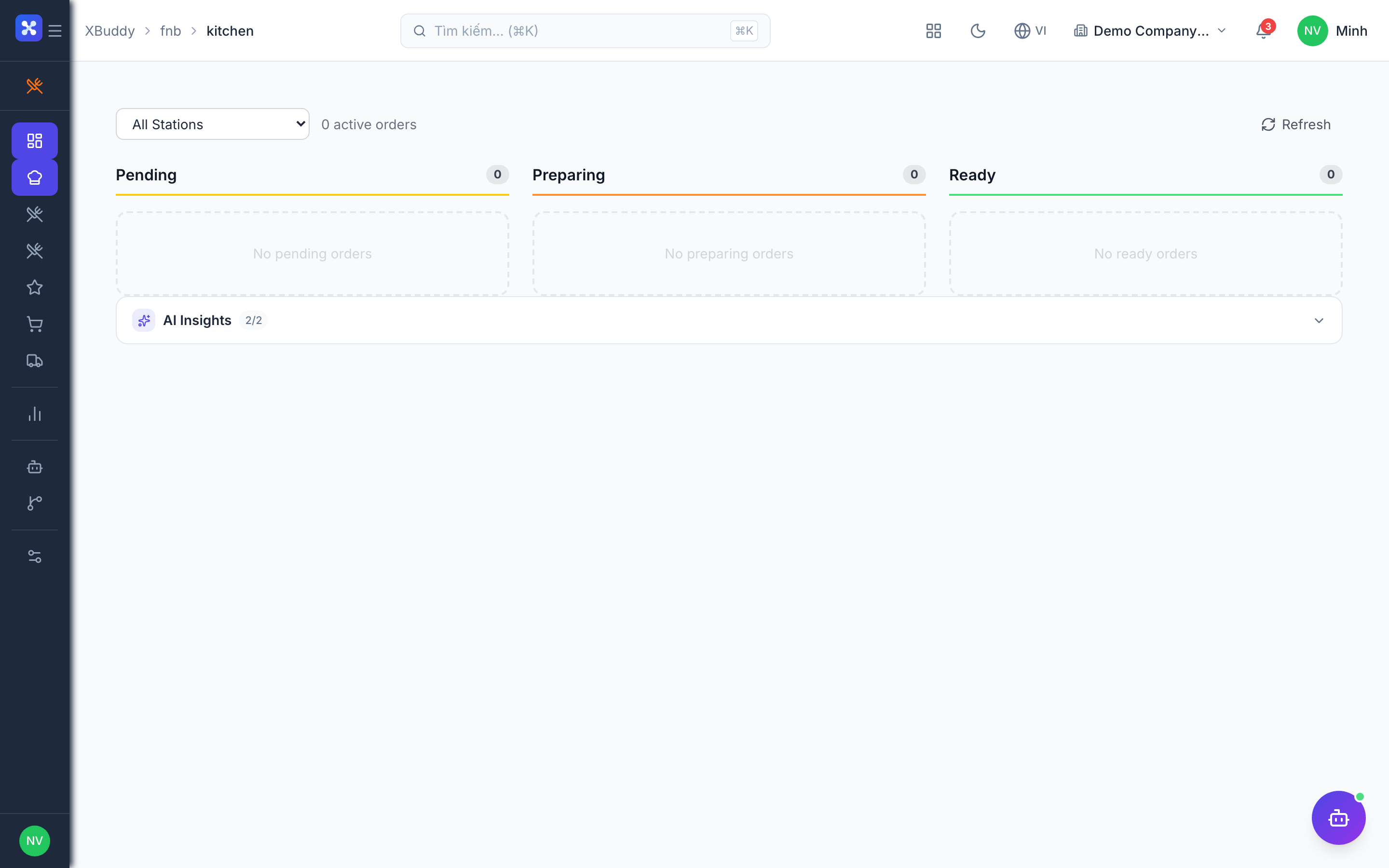
The Kitchen Display System (KDS) replaces paper tickets — every order, from any channel, appears as a live card the line can bump as it cooks.
Open the display
Go to F&B → Kitchen. Incoming tickets from POS, online ordering, and delivery all land here in real time.
Track preparation
Each ticket shows items, modifiers, and a timer. Move a ticket through new → in progress → ready as the kitchen works it.
Bump completed orders
Mark a ticket ready/served to clear it from the active queue; it stays in history for throughput analysis.
Building the menu and recipes
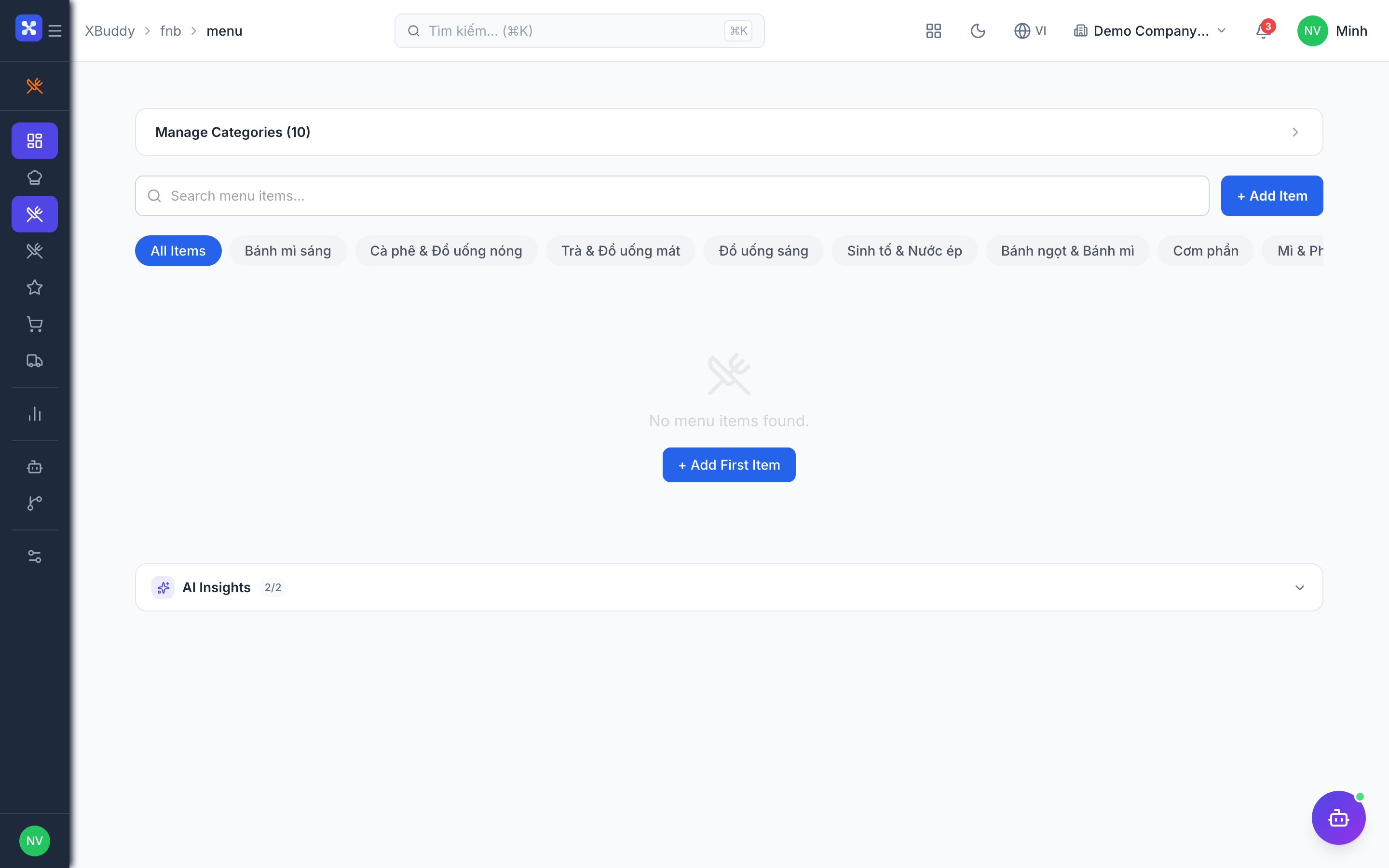
The menu is what customers order; the recipe is what the kitchen makes. Linking them is what makes ingredient consumption and food-cost tracking automatic.
Define menu items
Go to F&B → Menu to create items, categories, modifiers (e.g. size, extras), and combos, with per-channel pricing.
Attach recipes
Go to F&B → Recipes and map each dish to its ingredients and portion quantities, pulling ingredients from Inventory stock items.
Let cost roll up
XBuddy computes cost-per-portion from live ingredient costs, so your food-cost % updates as purchase prices move.
Automatic ingredient consumption
This is the engine of F&B: when a dish sells, its recipe tells XBuddy exactly which raw materials to deplete — no manual stock counts per sale.
Sell a dish
An order is placed at POS or an online channel and confirmed.
Recipe explodes to ingredients
Each sold item’s recipe is expanded into base ingredients (with UOM conversion), and Inventory decrements the raw stock.
Compare theoretical vs actual
Reports contrast expected consumption (from recipes) against actual stock movement, surfacing variance and waste.
Loyalty, online ordering & delivery
Beyond the counter, F&B captures repeat customers and off-premise revenue through loyalty, a web storefront, and delivery dispatch.
Enrol loyalty members
Go to F&B → Loyalty to configure points and tiers; members are recognised at POS and earn/redeem automatically.
Take online orders
F&B → Online Ordering exposes a storefront; web/app orders flow straight into the Kitchen Display and inventory loop.
Dispatch delivery
F&B → Delivery assigns drivers, tracks order status, and manages hand-off for delivery orders.
Full feature reference
| Nav item | What it does |
|---|---|
| Dashboard | Operational overview — today’s sales, order count, food-cost %, top items, and channel mix (dine-in / online / delivery). |
| Kitchen | The Kitchen Display System: live order tickets from every channel, prep timers, and bump-to-ready workflow for the line. |
| Menu | Manage menu items, categories, modifiers, combos, allergen/dietary tags, and channel-specific pricing. |
| Recipes | Recipe cards mapping each dish to ingredients and portions, driving cost-per-portion and automatic stock depletion. |
| Loyalty | Points-and-tiers loyalty program; members earn and redeem at the till and across channels. |
| Online Ordering | Web/app storefront that captures customer orders directly into the kitchen queue and inventory loop. |
| Delivery | Driver assignment, delivery status tracking, and dispatch for off-premise orders. |
| Reports | Food-cost %, theoretical-vs-actual variance, best/worst sellers, waste, throughput by time slot, and channel revenue. |
| AI Hub | Run the F&B Ops and POS Manager assistants for food-cost, throughput, and waste insights. |
| Workflows | Automation for F&B events — low-stock alerts on key ingredients, waste-threshold nudges, or reorder triggers. |
| Settings | Kitchen stations, tax and service charges, channel setup, loyalty rules, and delivery zones. |
Integration points
| Connects to | How the data flows |
|---|---|
| POS | Counter sales originate here; each ticket flows into the Kitchen Display and triggers recipe-based ingredient consumption. |
| Inventory | Recipes deplete raw ingredient stock as dishes sell; purchase costs feed cost-per-portion and food-cost reporting. |
| Distribution | For multi-outlet brands, central kitchens and commissaries replenish outlets through the distribution network. |
| Procurement | Ingredient reorders raised from low-stock signals become purchase orders to suppliers. |
| Finance | Sales revenue and cost of goods post to the ledger for margin and P&L reporting. |
Related AI agents
| Agent | What it does |
|---|---|
| F&B Ops | Monitors food-cost variance, kitchen throughput, and waste patterns; flags high-variance dishes and recommends portion, prep, or menu adjustments. |
| POS Manager | Analyses sales mix, peak-hour performance, and channel trends across dine-in, online, and delivery to surface upsell and staffing insights. |
Common workflows
1. Launch a new dish
- Create the menu item in F&B → Menu with pricing and modifiers.
- Attach a recipe in F&B → Recipes, mapping ingredients and portions.
- Sell it — the Kitchen Display shows the ticket and stock depletes automatically as orders complete.
2. Control food cost
- Open F&B → Reports and review theoretical-vs-actual variance by item.
- Identify dishes where actual consumption exceeds recipe expectation.
- Adjust portions or prep, or re-price the item, then re-check variance next period.
3. Fulfil an online + delivery order
- A customer orders through Online Ordering; the ticket appears in Kitchen.
- The line prepares and bumps it to ready.
- Delivery assigns a driver and tracks status until hand-off.
FAQ
Do I need POS and Inventory for F&B? Yes. F&B is a vertical add-on: orders flow through POS and ingredient depletion posts against Inventory stock. Both modules must be active.
How does selling a dish reduce ingredient stock? Each menu item is linked to a recipe. When the dish sells, the recipe is exploded into its ingredients (with unit conversion) and Inventory decrements those raw materials automatically.
What is theoretical vs actual food cost? Theoretical cost is what your recipes say you should consume for the dishes sold; actual is what stock movement shows you did consume. The gap is variance — usually waste or over-portioning.
Can I take orders from more than one channel? Yes. Dine-in (POS), online ordering, and delivery all feed the same Kitchen Display and inventory loop, and reports break down revenue by channel.
Where do loyalty points get applied? At the POS till and across online channels — members are recognised automatically and earn/redeem per the rules you set in F&B → Loyalty.
Can I flag allergens and dietary options? Yes. Menu items carry allergen and dietary tags so staff and online customers can see them at the point of order.