Procurement
XBuddy Procurement runs your full source-to-pay cycle: a requisition is raised, quotes are collected from vendors, a purchase order is issued, goods are received, and a bill is matched and paid — all under approval chains and 3-way match controls. It carries the vendor master, price lists, contracts, scorecards, and the returns/debit-note flow so spend stays governed and auditable.
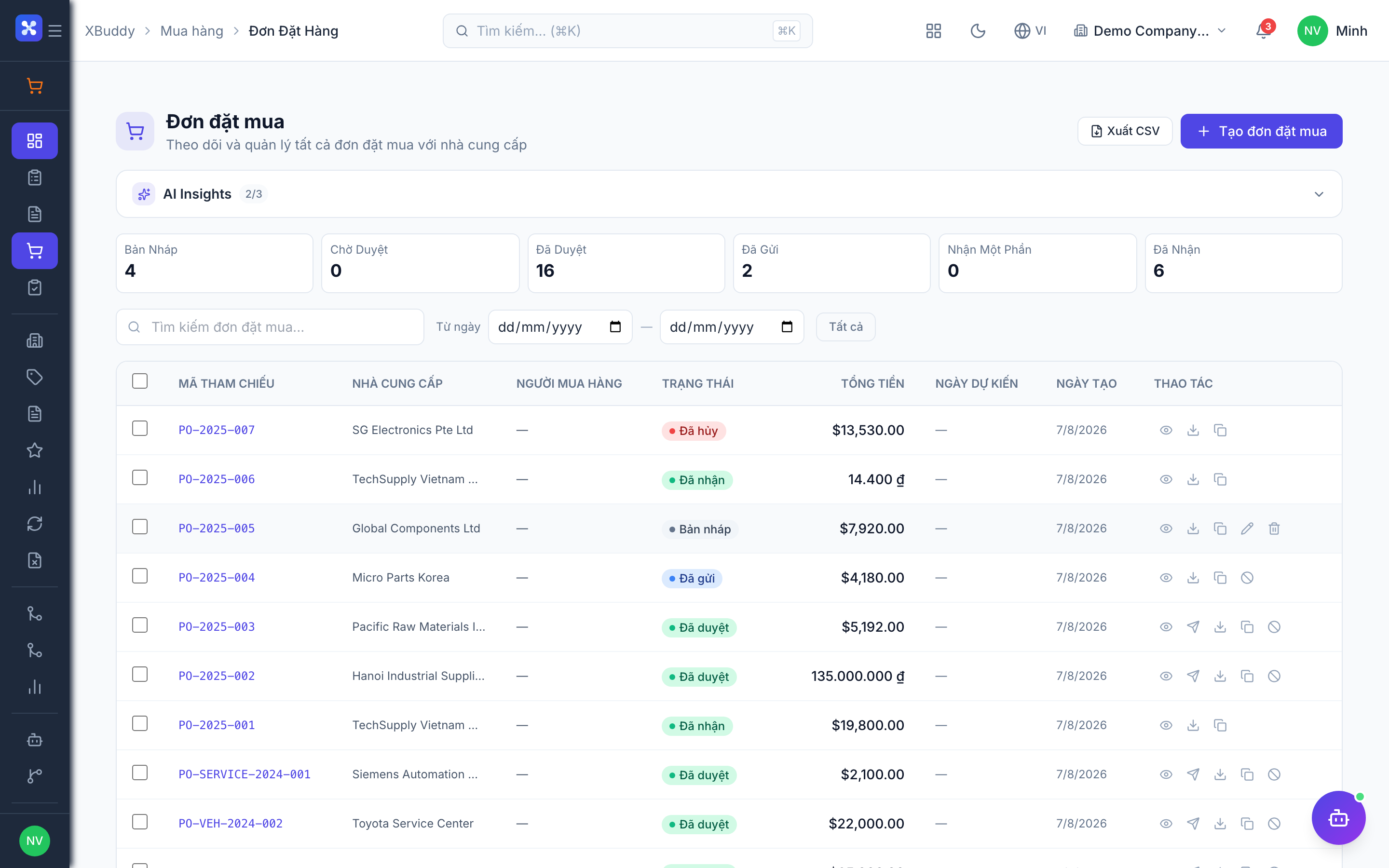
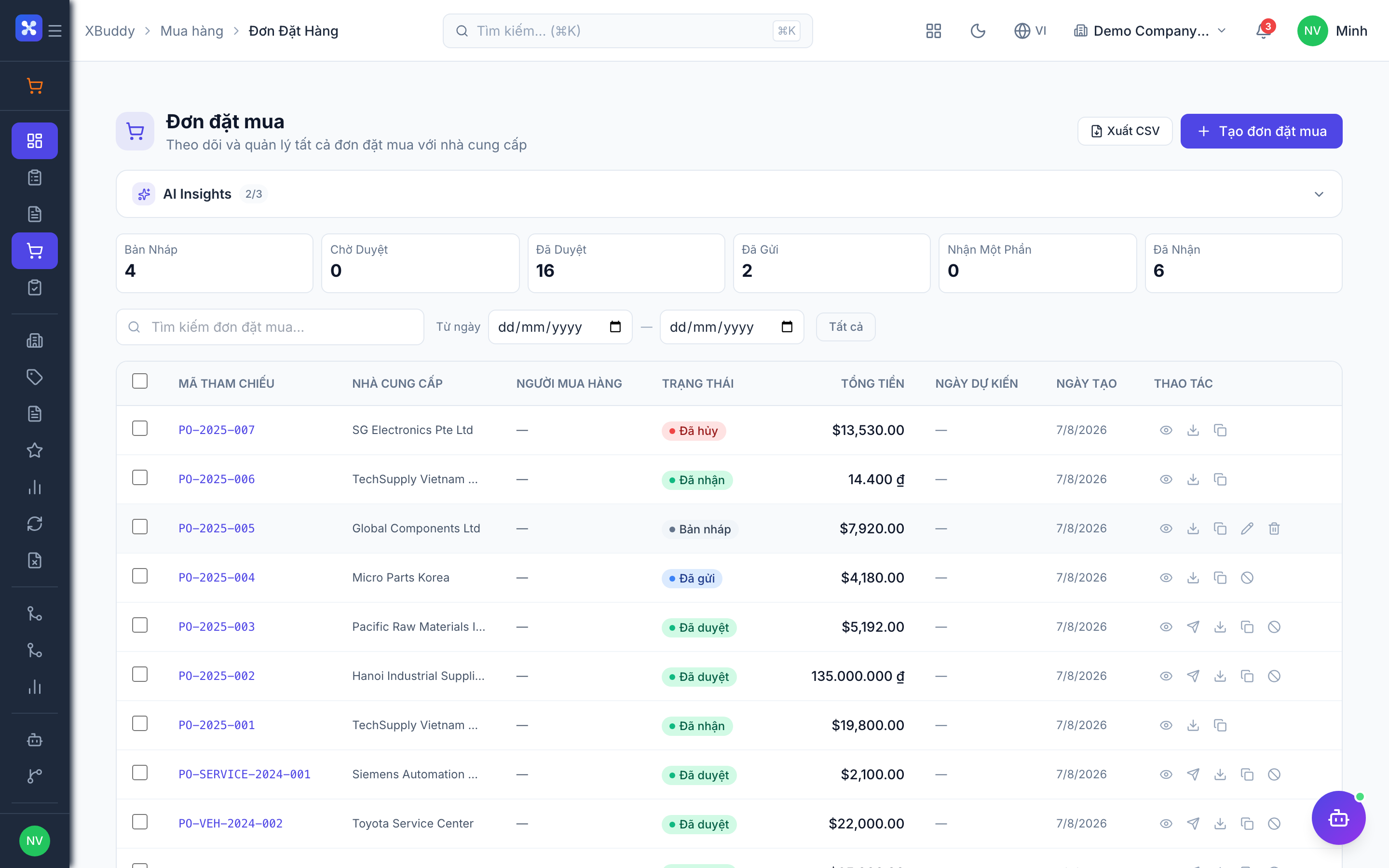
PR → RFQ → PO → GRN → Bill. Each step links to the next in the Document Chain, so from any purchase order you can trace back to the originating requisition and forward to the goods receipt and vendor bill.
Key Features
- Purchase Requisitions with approval routing and budget checks
- RFQs to multiple vendors with side-by-side quote comparison
- Purchase Orders that convert directly from an approved requisition or RFQ
- Service Confirmations for non-stock service purchases
- Goods receipt integration and 3-Way Match (PO ↔ GRN ↔ Bill)
- Vendor master with Price Lists, Contracts, Preferences, and Scorecards
- Vendor Returns and Debit Notes with full reversal handling
- Configurable Approval Chains by amount, category, and department
- Reports on spend, on-time delivery, and vendor performance
Important features
The requisition-to-PO flow
A requisition captures a need before it becomes a commitment. Once approved, it converts to an RFQ or straight to a PO.
Raise a requisition
Go to Procurement → Purchase Requisitions (/procurement/requisitions) and click New Requisition. Add line items, quantities, needed-by dates, and the charging cost center. Budget checks run if budget control is enabled.
Route for approval
Submit. The requisition follows the configured Approval Chain based on total amount and category.
Convert to RFQ or PO
Once approved, convert to an RFQ to shop the requirement, or issue a Purchase Order directly to a preferred vendor.
Track to receipt
The PO links forward to the Goods Receipt (in Inventory) and the Vendor Bill (in Finance) in the Document Chain.
RFQs and quote comparison
RFQs let you request pricing from several vendors and compare responses before committing.
Create the RFQ
Go to Procurement → RFQs (/procurement/rfqs) and select the requisition lines to quote. Add the vendors to invite.
Collect responses
Enter each vendor’s quoted price, lead time, and terms as they respond.
Compare and award
Use the side-by-side comparison to pick the best offer on price and lead time, then convert the winning quote to a Purchase Order.
3-Way Match
3-Way Match protects against overbilling by requiring the purchase order, goods receipt, and vendor bill to agree before payment.
Open the match workbench
Go to Procurement → 3-Way Match (/procurement/three-way-match).
Review discrepancies
The system compares PO quantity/price, received quantity, and billed amount. Mismatches beyond tolerance are flagged.
Resolve or hold
Approve a matched bill for payment, or hold a flagged bill and raise a Debit Note or Vendor Return where the discrepancy is genuine.
A bill that fails 3-way match should not be paid until the quantity or price discrepancy is explained. Use a Debit Note for price/short-delivery adjustments and a Vendor Return for returned goods.
Vendor management and scorecards
The vendor master centralises everything you know about each supplier and scores their performance over time.
Maintain vendors
Go to Procurement → Vendors (/procurement/vendors) to manage vendor records, then attach Price Lists, Vendor Contracts, and Preferences (preferred vendor per category).
Track performance
Open Procurement → Scorecards (/procurement/scorecards) to review on-time delivery, quality, and price competitiveness scores derived from actual PO and GRN history.
Set preferences
Mark preferred vendors so requisitions and RFQs default to your best suppliers.
Returns, debit notes, and service confirmations
Handle returned goods
Go to Procurement → Vendor Returns (/procurement/vendor-returns) to return defective or over-delivered stock; this reverses the receipt and adjusts inventory.
Raise a debit note
Use Procurement → Debit Notes (/procurement/debit-notes) for price corrections and short deliveries that do not involve physically returning goods.
Confirm services
For consulting, installation, or subcontracting, use Procurement → Service Confirmations (/procurement/service-confirmations) to acknowledge service completion before billing.
Full feature reference
| Nav item | Path | What it does |
|---|---|---|
| Overview | /procurement | KPI dashboard — open POs, spend, and vendor performance |
| Purchase Requisitions | /procurement/requisitions | Capture and approve purchase needs |
| RFQs | /procurement/rfqs | Request and compare vendor quotes |
| Purchase Orders | /procurement/purchase-orders | Issue and track committed orders |
| Service Confirmations | /procurement/service-confirmations | Acknowledge completion of service purchases |
| Vendors | /procurement/vendors | Vendor master records and contact details |
| Vendor Price Lists | /procurement/vendor-price-lists | Negotiated pricing per vendor and item |
| Vendor Contracts | /procurement/vendor-contracts | Framework agreements and terms |
| Vendor Preferences | /procurement/vendor-preferences | Preferred vendor per category |
| Scorecards | /procurement/scorecards | Vendor performance scoring |
| Vendor Returns | /procurement/vendor-returns | Return goods and reverse receipts |
| Debit Notes | /procurement/debit-notes | Price/short-delivery adjustments |
| 3-Way Match | /procurement/three-way-match | Reconcile PO, GRN, and bill before payment |
| Approval Chains | /procurement/approval-chains | Configure approval routing rules |
| Reports | /procurement/reports | Spend, delivery, and vendor analytics |
| AI Hub | /procurement/ai-hub | Procurement AI agents and suggestions |
| Workflows | /procurement/workflows | Automation rules for procurement steps |
| Settings | /procurement/settings | Module configuration and defaults |
Integration points
| Integrates with | Direction | What flows |
|---|---|---|
| Inventory | Outbound | Purchase orders drive goods receipts (GRN) that increase stock |
| Finance | Outbound | Received POs generate vendor bills for payment |
| Accounting | Outbound | Bills and returns post journal entries to the GL |
| Field Service | Bidirectional | Subcontracting purchases and parts requisitions link to jobs |
| Budgets | Inbound | Requisitions and POs check against budget when control is enabled |
Related AI agents
| Agent | What it does |
|---|---|
| Procurement Assistant | Monitors open POs for late delivery, flags 3-way-match mismatches, and suggests reorder and vendor actions |
Common workflows
Standard purchase
- Raise a requisition and route it for approval.
- Issue an RFQ or convert directly to a Purchase Order.
- Receive goods (GRN in Inventory) against the PO.
- Run 3-way match on the vendor bill, then approve for payment.
Handling a short delivery
- Confirm the received quantity on the GRN.
- 3-way match flags the shortfall against the bill.
- Raise a Debit Note for the undelivered value, or a Vendor Return for rejected goods.
Onboarding a new vendor
- Create the vendor record and add a Price List.
- Attach any Vendor Contract and set category Preferences.
- Begin issuing POs; the Scorecard accrues performance over time.
FAQ
Can I create a PO without a requisition? Yes. A requisition is the controlled path, but you can create a Purchase Order directly. Approval chains still apply based on amount and category.
What is the difference between a Debit Note and a Vendor Return? A Vendor Return physically sends goods back and reverses the inventory receipt. A Debit Note is a financial adjustment (price correction, short delivery) with no stock movement.
How does 3-way match tolerance work? Small differences within the configured tolerance pass automatically. Anything beyond it is flagged for review so you can approve, hold, or raise an adjustment.
Why can’t I edit an approved purchase order? Approved and received POs are controlled — edits route through an amendment request to preserve the audit trail rather than silently changing a committed order.